Email Control Center 1
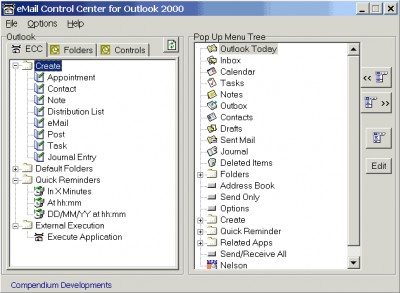
 Access your Outlook 2000 functionality from your system tray.
|

 16.00
16.00  Shareware
 0K
0K
 Windows Vista
Access your Outlook 2000 functionality from your system tray. One icon click and you have access to a popup menu with the functions you setup in the order that you like to use them. Create emails, appointments, reminders, and memos. Jump to specific outlook folders. Make email easy.
tags
Download Email Control Center 1
 Download Email Control Center 1
Purchase:  Buy Email Control Center 1
Authors software
 Compendium-TA 1.4
Compendium Developments
Compendium-TA is an outliner, a Graph Diagrammer, a cross-referencer, an entity modeller, a system prototyper, in short it is a flexible general purpose modelling tool.
Email Control Center 1
Compendium Developments
Access your Outlook 2000 functionality from your system tray.
 URL Control Center 1
Compendium Developments
Manage your url faves from your system tray.
Similar software
Email Control Center 1
Compendium Developments
Access your Outlook 2000 functionality from your system tray.
 QuickRun 3.12 build 943
Partridge Software
QuickRun is a handy quick-launch utility and system tray organizer for Windows 98/ME/2000/XP.
 Fast Printer Chooser 4.8
AL-Software team
The "Fast Printer Chooser" software can be used to quickly and conveniently switch the active printer using a tray popup menu.
 ASTC 1.50
CprinGold Software
ASTC component provides an easy way to enable your VB, VC++, C#, VB.
 dbzOutlookTray 1.5.32
Division by Zero Software Engi
dbzOutlookTray creates a tray icon after it's launch.
 Favorite Shortcuts 1.8.3
ContextMagic.com
Favorite Shortcuts is a very easy-to-use quick launch utility that provides one-click access to the hierarchical list of favorite documents, programs and folders.
 Xplore 1.0
Boscado Enterprises
Xplore was deisgned as an easy to use application which will allow you to open the Windows explorer to a particular drive on your system.
 Tray Dialer 1.0
Kemsoft
Tray Dialer is a simple telephone dialer that sits on the Windows System Tray.
URL Control Center 1
Compendium Developments
Manage your url faves from your system tray.
 Active Tray 2.2 build 5.1028
Divcom Software
For most PC users, the Windows System Tray is used to occasionally check the date and time, and, more rarely, to run a program or two.
Other software in this category
 Postal Inspector Outlook 2000/2002/XP Edition 3.0
Giant Company Software
Say Good Bye to Spam! Time you spend working is valuable, so having your email inbox flooded with messages is not only annoying but also costly.
 Secure Address Book 1.0
Brady & Associates, LLC.
Secure Address Book for Windows allows you to protect your email contact information in a secure, encrypted database file that is totally immune to email viruses and worms.
 Forgotten Mailbox Password 2.0
ZZEE
Need to recover the mailbox password that is shown as a series of asterisks in the email program?
This program can do it for any POP3 compatible email client, that stores the passwords, such as Eudora, Netscape, IncrediMail, MS Outlook, Outlook Express, Opera, The Bat!, etc.
 AnswerTool 2.3.1
DTLink Software
AnswerTool - Turn email answers into assets!
Save your email answers with AnswerTool, then use them again and again.
 MailArmor 1.1.2 for Windows
Paolo Manna
MailArmor helps to keep your electronic mailbox free of spam: it looks at the relevant parts of your email before it leaves the mail server, and lets the legitimate messages pass through undisturbed, while leaving suspect messages on the server, "invisible" for the e-mail client, to be reexamined later or just deleted after a while.

 RSS
RSS