Favorite Shortcuts 1.8.3
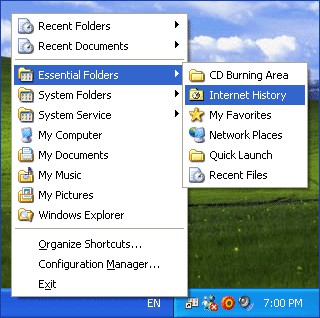
 Favorite Shortcuts is a very easy-to-use quick launch utility that provides one-click access to the hierarchical list of favorite documents, programs and folders.
|

 14.00
14.00  Shareware
 0K
0K
 Windows Vista
Favorite Shortcuts is a very easy-to-use quick launch utility that provides one-click access to the hierarchical list of favorite documents, programs and folders.
It is available as an additional submenu in the Desktop context menu, in a folder background shortcut menu, in the Windows Explorer File menu, in the Internet Explorer Favorites menu and as an optional icon in the taskbar (system tray).
To invoke it, right-click on the Desktop (or any other folder background), select Favorite Shortcuts and then click an item on the popup menu.
Also this quick launch menu available on right-clicking at the Favorite Shortcuts system tray icon.
To add new items to the favorite shortcuts list right-click a file or folder in Windows Explorer, and select Add to Favorite Shortcuts.
The Favorite Shortcuts menu is a perfect replacement of Start Menu as well as Quick Launch Toolbar. It provides fast and convenient access to the frequently used applications, files and folders, and allows to clean up your Desktop and keep it as bare as possible.
Favorite Shortcuts features
Limitations
tags favorite shortcuts the windows quick launch system tray the favorite folder background windows explorer favorites menu explorer favorites desktop context right click the desktop internet explorer
Download Favorite Shortcuts 1.8.3
 Download Favorite Shortcuts 1.8.3
Purchase:  Buy Favorite Shortcuts 1.8.3
Authors software
 Context ThumbView 1.8.6
ContextMagic.com
Context ThumbView is a Windows Explorer context menu extension that will provide image preview directly in the right-click menu.
 Instant ThumbView 1.8.6
ContextMagic.com
Instant ThumbView is a tiny image viewer that displays image thumbnails in a tooltip window, when mouse pointer is hovered over an image file in Windows Explorer.
Favorite Shortcuts 1.8.3
ContextMagic.com
Favorite Shortcuts is a very easy-to-use quick launch utility that provides one-click access to the hierarchical list of favorite documents, programs and folders.
 Express Mail@Mate 2.6.7
ContextMagic.com
Express Mail@Mate is an email notification program for Microsoft Outlook and Outlook Express.
 ClickYes Pro 2.5.7
ContextMagic.com
ClickYes Pro is a Microsoft Outlook security configuration tool.
Similar software
Favorite Shortcuts 1.8.3
ContextMagic.com
Favorite Shortcuts is a very easy-to-use quick launch utility that provides one-click access to the hierarchical list of favorite documents, programs and folders.
 Launch Express 1.10.0
Nextriver Software
Launch Express is a small utility, but it makes a big difference.
 True Launch Bar 4.1.7 RC
TrueSoft
True Launch Bar is a Superior replacement for the standard Quick Launch bar.
 Launch-n-Go 3.0
Tethys Solutions, LLC
Launch-n-Go is a Program Launcher, Text Inserter, Keyboard Shortcut Manager & Desktop Toolbar and a very smart multiaction productivity software.
 HotKey Magic 1.3.1
DonovanDunning
HotKey Magic is a quick-launch utility that allows you to open your frequently used programs and folders.
 Remora USB Quick Launch Pro 1.8.0.0
Essential Skill Consultants Limited
Remora : warmwater fishes of the family Echeneidae, characterized by an oval sucking disk on the top of the head.
 Iconomizer 2.52
Kassis Technologies
The Iconomizer will allow you to quickly access your most commonly used documents, applications, folders and other file types.
 ABF Favorite Folders 1.31
ABF software, Inc.
ABF Favorite Folders will allow you to easily store, manage and access a list of frequently used folders.
 Flexiblesoft Launcher 3.1
FlexibleSoft Co.
Flexiblesoft Launcher is a small application that will allow you one mouse-click access to a pop-up menu of your favorite shortcuts, minimizing use of valuable desktop space and system resources.
 Quick Starter 3.1
Boyarick Net
Quick Starter offers you quick access to your favorite applications, documents, folders and network shared files.
Other software in this category
 AutoMove 1.9.4
K.Tkalec
AutoMove is a service, which moves, copies and renames files/direcotries on hard disks by user defined criteria.
 1 Click Runner 2.0
Gapso Software
1 Click Runner is specially designed for fast start of programs, fast opening files, fast access to WWW and FTP sites, fast starting of e-mail writing, and fast creation of links.
 Windows Keyboard Indicator 2.0.1
Clever Components
Windows Keyboard Indicator is a small utility which stays in your windows system tray.
 Invisible Launcher 1.01
Segobit Software
Invisible Launcher is a configurable software designed to offer you a fast way to organize and start up your applications and to open folders, shortcuts and documents that you frequently access.
 LogonStudio 1.0
Stardock Corporation, Inc.
LogonStudio allows users to easily customize new logon screens for Windows XP.

 RSS
RSS