PocoMail 4.1
 PocoMail is easy to install, maintain and use, and yet does not sacrifice functionality.
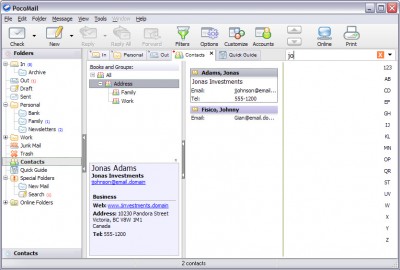
PocoMail is easy to install, maintain and use, and yet does not sacrifice functionality. PocoMail makes email fun again while it saves you valuable time.
Spend quality time with your email program, not a quantity of time. Your daily email duties should be enjoyable, yet be kept short and productive.
Take a look at some of the features PocoMail offers, designed to help you spend less time on email every day, while making sure you are always safe and protected.
PocoMail features
Filters: filter messages by variety of conditions and actions; text matching can be made to ignore special characters and HTML comments to foil common spam tactics.
Junk Mail Filters: enable sophisticated and flexible junk mail filters to help you deal with spam; PocoMail even integrates sophisticated learning Bayesian junk mail filter for accurate spam removal.
Productivity - Tabbed mailbox access: pin your frequently used mailboxes for quick access; drag messages directly to tabs; open mailboxes in current or new tabs.
Message Threading: each mailbox can be set to threaded view, so that you can follow conversation threads which is especially useful for reading newsgroups.
Selective Index View: quickly turn a mailbox of 10,000 messages into a view of 10 messages from the sender you need; or show only unread messages; or only messages received today; revert to full view easily.
Templates: setup templates to quickly compose repetitive messages; Templates can also be used to send form-replies to common queries.
Followup Link: if you view a message that you already replied to PocoMail will show a Followup Link along the top of the preview pane with a direct access to the reply you sent originally.
Text Auto-complete: if you write a certain phrase over and over again when composing mail, utilize our auto-complete feature so that typing "addr" expands right away into your full address.
Flexible Attachments Handling: supported attachments are previewed right inside the message, or with quick to access tabs, whether they are left encoded in the message or not.
Special Features - PocoScript: exercise the ultimate control over your mailbox with the built-in scripting language; run your scripts on incoming messages, selected messages and even on timed or application-based events.
PocoConsole: get instant overview and access to newly arrived mail; read and respond directly from PocoConsole without having to open the main application window.
Quote Bar: if you don't like to quote complete messages when replying then don't - use the Quote Bar inside the Compose window to selectively quote the original message with a single click.
Utilities - Message Markings: messages can be quickly marked with mouse or keyboard; once marked, they can be easily shown on their own, or even searched based on the mark applied.
Skinning: change the application appearance, from colours to graphics, so it better suits your working environment.
Emoticons: add some flare to your messages by inserting some of over 50 provided emoticons; these are tiny images that are actually sent with the message and viewed with almost any email client.
Full page preview pane: you have a nice monitor, why squint at your half-sized preview pane? PocoMail lets you view your preview pane in full.
Spell Checker: with spell-as-you-type you never have to worry about sending letter-perfect emails; dictionaries for other languages are also available.
Options: comprehensive set of program options allows you to fine tune PocoMail to your exact needs, including disabling most of PocoMail's interface and using barebones display.
Mailbox Options: override global program options on per-mailbox basis, including preview pane visibility and orientation; optionally, apply these settings to all sub-mailboxes.
Multiple Accounts: setup unlimited number of email accounts and newsgroup servers; drag and drop accounts in the order you wish to use them; many per-account options available.
Hierarchical Mailboxes: organize your mailbox to suit you, not the application - different email accounts can share mailboxes, while Online Mailboxes can let you read Newsgroups or view messages server.
Newsgroups Support: read Usenet or private newsgroups directly from PocoMail; save articles you need to your regular mailboxes; respond to authors or groups; pre-fetch next article automatically.
Vertical Index Display: besides allowing for full page preview pane, it presents your mailbox in an easy to read format, with one click access to message marking and even threading.
Application Toolbar: the very flexible toolbar lets you view it in several sizes, including the ability to customize which buttons you see on it.
Address Tools: add any address to your address book with a handy "+" button in the headers; get Report on Address with the other button, see if you have this address in any book or group and add it quickly.
Customize Application: tweak the application display, from different pane layouts available to you, to skins, colours, toolbar appearance and fonts.
Limitations
Your evaluation license expires after 45 days. If after that time you continue using the software you are required to purchase it. You will unlock the few features disabled in the evaluation version. You will be able to: - Use the Email Support menu to report problems; - Your sent email will have the X-Mailer header as "PocoMail Licensed", instead of "PocoMail EVALUATION", showing your support; - Remove further purchase reminders.
See
tags preview pane the message with the the application you view your mailbox junk mail page preview full page you are you have lets you you will
Download PocoMail 4.1
 Download PocoMail 4.1
Purchase:  Buy PocoMail 4.1
Authors software
PocoMail 4.1
Poco Systems
PocoMail is easy to install, maintain and use, and yet does not sacrifice functionality.
 PocoMail Portable Edition 3.03 Build 1780
Poco Systems
Similar software
PocoMail 4.1
Poco Systems
PocoMail is easy to install, maintain and use, and yet does not sacrifice functionality.
 ABC Amber PocoMail Converter 5.06
ProcessText Group
Powerful tool which helps you backup and archive your important correspondence organized in one file, converting emails from PocoMail (very popular email client) to any format you wish (CHM, PDF, HTML, RTF, HLP, TXT Ansi, TXT Unicode, DOC, EML, DBF, XML, CSV, XLS, MCW, WPS, SAM, RFT, WS4, WS7, WRI, etc.
PocoMail Portable Edition 3.03 Build 1780
Poco Systems
 Email Password Recovery Master 2.0
Rixler Software
Email Password Recovery Master is a program that displays logins and passwords for email accounts stored by Eudora, The Bat!, Becky, IncrediMail, Gmail Notifier, Group Mail Free, PocoMail, Forte Agent, Mail.
 Right Email Backup 2.6
RightFiles.com
Right Email Backup will performs scheduled backup of business correspondence, partners and clients contacts, important letters and attached files stored in your e-mail application.
 Adolix Outlook Express Backup 3.0
Adolix
Adolix Outlook Express Backup is the easiest way to backup email data (emails, accounts, signatures, address book, settings, message rules and blocked senders lists) from Top 9 Email Clients.
 Click and Keep 1.4.4.90
Engelmann Media GmbH
Click and Keep is the solution to make easy backups with only a few clicks.
 XMedia EMail Backup 2.1.3
XMedia Software Company
XMedia Email Backup is an application which creates backup copies of your emails.
 Email Saver Xe 1.7
Amic Games
Email Saver Xe is an utility designed to easily create a backup or archive file of your mail data from your favorite Email Client, which may easily be restored when necessary.
 Aid4Mail 2.04
Fookes Software
Aid4Mail is a user-friendly Windows tool that helps you migrate your email messages to a different mail client, export them for viewing through Internet Explorer, MS Excel, or a database, convert them to extract or re-insert attachments, and archive them to save space or for compliance with legal requirements.
Other software in this category
 KinderMail 1.0.0
Kinder Shield Labs
KinderMail is a POP3 e-mail client designed for children ages 3 to 11.
 Geminisoft Pimmy 4.1
Geminisoft
Geminisoft Pimmy is your personal postman.
 JBMail 3.3 beta 2
Jem Berkes
JBMail is a compact and portable secure e-mail client.
 Starfish Family Mail 1.51
Lincoln Beach Software
Starfish Family Mail is a useful Windows email program which allows you to communicate via email with all your friends and family!
Parents or teachers can set up friend lists for each person so that you can rest assured that they are only communicating with their friends! Each person logs in as themselves and using passwords they can keep others out.
 Bulk News 2006 3.0
TEC Software
Bulk Post to over 2000 newsgroups an hour with this Internet marketing application.

 39.00
39.00  Trial
Trial 0K
0K
 Windows Vista

 RSS
RSS