MadLogic ScreenShot 1.5
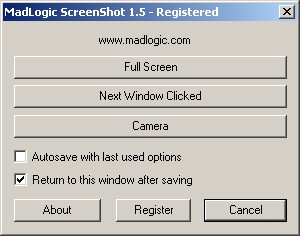
 MadLogic ScreenShot software allows you to quickly and easily capture images of specific windows, your entire desktop, or any rectangular onscreen area.
|

 10.00
10.00  Demo
Demo 0K
0K
 Windows Vista
MadLogic ScreenShot software allows you to quickly and easily capture images of specific windows, your entire desktop, or any rectangular onscreen area.
Once you have selected the target area or window you can choose to save it as either a Window Bitmap or a JPEG file.
When you choose the "Next window clicked" option, MadLogic ScreenShot will capture the next window you click with the mouse and allow you to save it with or without the border.
Regardless of how you select the image to capture you have the option to scale the image to half-size or flip it horizontally or vertically before saving.
And to save you time, MadLogic ScreenShot can automatically save with the last used options. When saving with the last used options, the image file will be saved in the same location as the last image, with a number appended to the filename that is incremented each time. For example, your files would be named something like myscreenshot1.bmp, myscreenshot2.bmp, etc.
tags the last the image with the madlogic screenshot last used used options next window you have window you the next
Download MadLogic ScreenShot 1.5
 Download MadLogic ScreenShot 1.5
Purchase:  Buy MadLogic ScreenShot 1.5
Authors software
 MadCalc 1.1
MadLogic, Inc.
MadCalc is a full featured graphing calculator application for your PC running Windows.
 MadLogic Encryptor 1.0
MadLogic, Inc.
MadLogic Encryptor is an easy to use, personal encryption package for the home or office.
MadLogic ScreenShot 1.5
MadLogic, Inc.
MadLogic ScreenShot software allows you to quickly and easily capture images of specific windows, your entire desktop, or any rectangular onscreen area.
Similar software
MadLogic ScreenShot 1.5
MadLogic, Inc.
MadLogic ScreenShot software allows you to quickly and easily capture images of specific windows, your entire desktop, or any rectangular onscreen area.
 No Fuss Screenshot 1.6
Informatique sur Mesure Sarl
No Fuss Screenshot is a Windows utility that allows users to quickly make screenshots.
 Screenshot Utility 1.0
QSX Software Group
Screenshot Utility is a screen capture program.
 LS Screen Capture 1.0.2193
Linos Software
LS Screen Capture will capture your desktop in several handy ways.
 Easy Screenshot Reloaded 3.0
dewave Software
Easy Screenshot Reloaded helps you to capture quick screenshots.
MadLogic Encryptor 1.0
MadLogic, Inc.
MadLogic Encryptor is an easy to use, personal encryption package for the home or office.
 Wsnap 1.3
wsnap.com
Wsnap is a screen capture tool that lets you take a screenshot of any portion of the screen.
 !Quick Screenshot Maker 2.0.37
Etrusoft Inc.
!Quick Screenshot Maker is an all-in-one tool for screen capturing, screenshot editing and image organization.
 Screenshot Magic 4.4
Devious Codeworks
Screenshot Magic will allow you to take screenshot images from the following sources: Full Desktop, Active Window (full or contents only) and DirectX Fullscreen (games).
 Abracadabra Instant Screenshot 1.48
Abracadabra Solutions
Abracadabra Instant Screenshot is an easy to use and versatile screenshot capture and edit utility.
Other software in this category
 Printkey-Pro 1.04
WareCentral
PrintKey-Pro is a system tray-based application which can capture
your screen or any part of it by pressing the PrintScrn key
(or any other key you configure).
 ScreenShot 2000
GutmannSoft
Using your Print Screen key, ScreenShot will capture your present screen and give you the options to save, modify, rename, display, email, copy and print your clipboard.
 JotSmart 1.1
Daily Toast Inc.
JotSmart software is the ideal utility to capture and mark up relevant information on your computer.
 ScreenFlash 1.7 build 0021
LuYi
If you want to build animated, interactive software tutorials in the shortest time, ScreenFlash is your best choice!
It is the easiest and most effective tool for demonstrating your software product, adding animations to your application's Help system, or training novices.
 CAPTUROV 1.0
Adrian Ivanov
Call Capturov and it will capture the complete screen and store it in a file called CAPTUROV.

 RSS
RSS