!Quick Screenshot Maker 2.0.37
 !Quick Screenshot Maker is an all-in-one tool for screen capturing, screenshot editing and image organization.
|

 39.00
39.00  Trial
Trial 0K
0K
 Windows Vista
!Quick Screenshot Maker is an all-in-one tool for screen capturing, screenshot editing and image organization.
!Quick Screenshot Maker can snap any part of the screen as you want - windows, regions, controls, DirectX game screen. It also supports grabbing cursor, long scroll window and timer-activated capture.
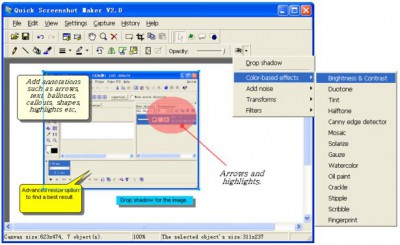
!Quick Screenshot Maker is a powerful screenshot editor. You can crop, cut, resize, rotate, mirror each image. Pick transparent color, change opacity, drop shadow, change brightness, contrast and add more than 40 visual effects to image.
Add text, callouts, arrows, highlights to the screenshot, and easily change annotations' position, size and other properties. Manage all the screenshots in the History Bar, easily open or insert an image file to current screenshot project.
!Quick Screenshot Maker has a user-friendly interface, and it's very powerful and easy to use.
Here are some key features of "Quick Screenshot Maker":
Limitations
tags screenshot maker quick screenshot all the visual effects more than add more current canvas arrows highlights screenshot and screenshot project image file change brightness easily change
Download !Quick Screenshot Maker 2.0.37
 Download !Quick Screenshot Maker 2.0.37
Purchase:  Buy !Quick Screenshot Maker 2.0.37
Authors software
!Quick Screenshot Maker 2.0.37
Etrusoft Inc.
!Quick Screenshot Maker is an all-in-one tool for screen capturing, screenshot editing and image organization.
 Advanced Image Resizer 2.0.22
Etrusoft Inc.
Advanced Image Resizer is an all-in-one batch image converter and resizer.
 Quick Screen Recorder 1.5.51
Etrusoft Inc.
Quick Screen Recorder is a video screen capture, screen recording tool used for recording screen activity into standard AVI video files.
Similar software
!Quick Screenshot Maker 2.0.37
Etrusoft Inc.
!Quick Screenshot Maker is an all-in-one tool for screen capturing, screenshot editing and image organization.
 Easy Screenshot Reloaded 3.0
dewave Software
Easy Screenshot Reloaded helps you to capture quick screenshots.
 Screenshot Utility 1.0
QSX Software Group
Screenshot Utility is a screen capture program.
 AT Screen Thief 3.9.14
Alex and Alex Soft
Easy to use interface makes this screenshot utility by an irreplaceable tool for people who like the speed and the power at the same time.
 Abracadabra Instant Screenshot 1.48
Abracadabra Solutions
Abracadabra Instant Screenshot is an easy to use and versatile screenshot capture and edit utility.
 Quick Screen Note 1.2
Oleansoft
Quick Screen Note - when you are using a computer (Office programs, Internet, E-mail, photo.
 Screenshot Studio Express 1.1.2
Jonker Software
Screenshot Studio Express is an easy to use screenshot manager.
 EasyShots 2.1.0.3
SempeSoft
EasyShots is a handy tool that will detect whenever a screenshot is taken using Print Screen or Alt + PrintScreen.
 EMCO Remote Screenshot 1.0
EMCO
EMCO Remote Screenshot is a handy, intuitive and simple utility which gives you the possibility to take screenshots of the remote machines on you network and save them to a file on your local computer.
 No Fuss Screenshot 1.6
Informatique sur Mesure Sarl
No Fuss Screenshot is a Windows utility that allows users to quickly make screenshots.
Other software in this category
 Printkey-Pro 1.04
WareCentral
PrintKey-Pro is a system tray-based application which can capture
your screen or any part of it by pressing the PrintScrn key
(or any other key you configure).
 ScreenShot 2000
GutmannSoft
Using your Print Screen key, ScreenShot will capture your present screen and give you the options to save, modify, rename, display, email, copy and print your clipboard.
 JotSmart 1.1
Daily Toast Inc.
JotSmart software is the ideal utility to capture and mark up relevant information on your computer.
 ScreenFlash 1.7 build 0021
LuYi
If you want to build animated, interactive software tutorials in the shortest time, ScreenFlash is your best choice!
It is the easiest and most effective tool for demonstrating your software product, adding animations to your application's Help system, or training novices.
 CAPTUROV 1.0
Adrian Ivanov
Call Capturov and it will capture the complete screen and store it in a file called CAPTUROV.

 RSS
RSS