Wsnap 1.3
 Wsnap is a screen capture tool that lets you take a screenshot of any portion of the screen.
|

 19.00
19.00  Shareware
 0K
0K
 Windows Vista
Wsnap is a screen capture tool that lets you take a screenshot of any portion of the screen. With this software in place, you can quickly create snapshots for your product page, multimedia presentation, technical manual, or a web article. Screenshots make your publication look appealing and more informative.
Sometimes a single look at a screenshot is more helpful in understanding the functional peculiarity of a product than a page of the most detailed textual description. Unique to Wsnap is its ability to capture almost all screen elements, including 3D games, Flash animations, cascading menus and more. All this is done with one mouse click.
Wsnap is a software that helps you make screenshots and edit them.
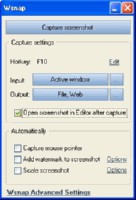
Wsnap has a simple user interface that takes you a minute and a few clicks here and there to get started with your first screenshot. You can use the tool to capture the entire screen, active windows, controls, cascading and floating menus, as well as rectangular, elliptic, rounded corners and freehand areas.
The program lets you capture the mouse pointer and add any watermark you want. Once the screenshot has been captured, you can save it to a file in the four most popular formats such as BMP, JPG, PNG and GIF. Additionally, the screenshot can be copied to the clipboard, opened in an external editor, published on the web, or sent by email.
Wsnap can be customized to suite your particular needs. If you are a fully fledged typist, you can customize hotkeys to trigger a particular capture action at a specified keystroke. With the hotkey support, you can capture a screenshot while working with another application.
To be more productive, Wsnap provides you with the ability to make a list of actions that will be automatically executed, once the screenshot has been captured. This includes all the after capture actions you do with mouse clicks, for example, saving the screenshot to a file, coping to the clipboard, adding a watermark, or scaling the output to fit the required size.
Limitations
30-day trial
tags you can the screenshot been captured the clipboard with the has been screenshot has capture the once the lets you and more
Download Wsnap 1.3

Purchase:  Buy Wsnap 1.3
Authors software
Wsnap 1.3
wsnap.com
Wsnap is a screen capture tool that lets you take a screenshot of any portion of the screen.
Similar software
Wsnap 1.3
wsnap.com
Wsnap is a screen capture tool that lets you take a screenshot of any portion of the screen.
 Screenshot Utility 1.0
QSX Software Group
Screenshot Utility is a screen capture program.
 Annotation Pilot 1.47
Two Pilots
Annotation Pilot lets you capture screen and label the screenshot.
 ZoomMagic 3.01
PeakStars
ZoomMagic is a powerful tool to magnify any portion of your screen, measure distances or capture a screen area.
 Miraplacid Screen Capture 1.0
Miraplacid
Miraplacid Screen Capture saves screenshots to JPEG, PDF, TIFF, PNG, BMP and TGA files or sends them to a printer.
 ScreenShot 2000
GutmannSoft
Using your Print Screen key, ScreenShot will capture your present screen and give you the options to save, modify, rename, display, email, copy and print your clipboard.
 EMCO Remote Screenshot 1.0
EMCO
EMCO Remote Screenshot is a handy, intuitive and simple utility which gives you the possibility to take screenshots of the remote machines on you network and save them to a file on your local computer.
 Super Screen Capture 6.1
ZeallSoft
Super Screen Capture is a useful and an all-in-one software for screen capture.
 No Fuss Screenshot 1.6
Informatique sur Mesure Sarl
No Fuss Screenshot is a Windows utility that allows users to quickly make screenshots.
 T.N.T Screen Capture 2.10
EC Software
T.
Other software in this category
 Printkey-Pro 1.04
WareCentral
PrintKey-Pro is a system tray-based application which can capture
your screen or any part of it by pressing the PrintScrn key
(or any other key you configure).
ScreenShot 2000
GutmannSoft
Using your Print Screen key, ScreenShot will capture your present screen and give you the options to save, modify, rename, display, email, copy and print your clipboard.
 JotSmart 1.1
Daily Toast Inc.
JotSmart software is the ideal utility to capture and mark up relevant information on your computer.
 ScreenFlash 1.7 build 0021
LuYi
If you want to build animated, interactive software tutorials in the shortest time, ScreenFlash is your best choice!
It is the easiest and most effective tool for demonstrating your software product, adding animations to your application's Help system, or training novices.
 CAPTUROV 1.0
Adrian Ivanov
Call Capturov and it will capture the complete screen and store it in a file called CAPTUROV.

 RSS
RSS