StudioLine Photo Classic 4.2.71
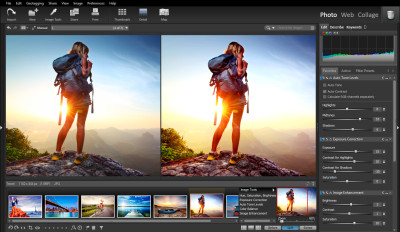
 StudioLine Photo Classic - Images can be imported from camera, scanner and all popular file formats.
|

 59.00
59.00  Trial
Trial 0K
0K
 Windows Vista
StudioLine Photo Classic - Images can be imported from camera, scanner and all popular file formats. The image archive is the central database where you categorize, edit add keywords and descriptions to your images.
Standard IPTC and Exif tags are fully supported. Over 30 professional image tools are included to improve exposure problems such as, red-eye effects, color tones, RAW file editing, and the ability to analyze images through an 18 view histogram.
StudioLine Photo Classic is a software that allows you edit and manage digital images.
Photos can be printed, emailed, uploaded as web galleries, or turned into calendars and greeting cards. CD/DVD writing is included - complete with printed CD inserts. Professional online printing is now available through EveryoneSmile.com with the click of the mouse. Available in English, French, German, Italian, & Spanish.
StudioLine Photo Classic features
New Customizable User Interface
XML Format for Exchanging Data with Other Applications
Backup Reminders
Expanded Database Search by Time Spans
Convenient Search and Replace
Special Export and Email Filters
Web-Gallery Design Wizard
Loading and Managing Media Files
Transition Effects for Slide Shows
Online Order for Prints and Gift Items
StudioLine Photo Classic features
Supported LanguagesSystem Requirements
Supported Browsers
Limitations
Wh
tags studioline photo photo classic your images bmp png gif jpeg tiff gif jpeg bmp png and image descriptors filters for the new web galleries with studioline
Download StudioLine Photo Classic 4.2.71
 Download StudioLine Photo Classic 4.2.71
Purchase:  Buy StudioLine Photo Classic 4.2.71
Authors software
Similar software
StudioLine Photo Classic 4.2.71
H&M Systems Software Inc
StudioLine Photo Classic - Images can be imported from camera, scanner and all popular file formats.
 StudioLine Photo Basic 4.2.71
H&M Systems Software Inc
StudioLine Photo Basic is a software that helps you manage digital images.
 StudioLine Web 3.50.52
H&M Systems Software Inc
StudioLine Web is an application that creates and publishes professional web sites in a single interface without any HTML knowledge.
 MBizGroup PhotoEditor 1.5
MBizGroup, LLC
MBizPhotoEditor is a tool for basic photo editing and viewing.
 3D Photo Browser for Digital Camera 11.04
Mootools
3D Photo Browser Std is a useful application that allows you to view, edit and organize your images, 3D files and audio files.
 Auto Photo Editor 9.42
ZeallSoft
Auto Photo Editor is designed to be an all-in-one photo editor for your batch photo editing converter.
 PhotoMail 4.0
GetWare
PhotoMail is developed as the easiest way to e-mail your digital photos and images.
 Photo Mixer 3.0
CCLA Software
With Photo Mixer create easily slide shows and video sequences from your digital photos or images.
 Photo Mud 3.0 build 357
Upperspace Corporation
Photo Mud will provide a rapid and simple method to view, enhance, organize, print, and, share your digital photos.
 FlashPhoenix Photo Recovery 7.1
FlashPhoenix.Com
FlashPhoenix Photo Recovery - need a sure solution for recovering lost, corrupted or accidentally deleted photographs?
FlashPhoenix Photo Recovery is a 100% risk-free application that salvages images from digital cameras or flash memory cards.
Other software in this category
 click'n share photo 1.0
Stomp
Organize your images and create slide shows and web pages that can be burned to CD-ROM.
 Album3D Builder 1.6
AM Software
Album3D is a digital DOOM-like photo album.
 Color By Number 2.5
STOIK Imaging
Color By Number allows you to convert photo to a paint-by-number pattern.
 Digital Photo Slide Show 2003.2
James M. Voelker
Digital Photo Slide Show is a suite of slide show creation tools to present your digital photos in a variety of slide show formats.
 Image M8 for Digital Photography 1.01
M8 Software(UK)
View, slideshow, photo enhance, remove red eye, crop, rotate, email and print your digital photos.

 RSS
RSS