Image++ 2.1
 Image++ is designed to be an object-oriented graphic development tool.
|

 49.00
49.00  Trial
Trial 0K
0K
 Windows Vista
Image++ is designed to be an object-oriented graphic development tool.
Image++ is designed for professional software developers working in the field of digital image processing as well as for beginners.
It was our aim to „get to the heart of the matter" by assisting digital image processing with an intuitive and problem-oriented visualization of the essential steps, so that quick and useful results can be achieved by beginners and professionals alike.
Image ++ doesn't only offer the user a large number of effective image processing routines, it also creates the opportunity for the user to combine the different steps of image processsing intuitively, and see interim results figuratively.
C++, object-oriented image processing
Not only that, Image++ additionally provides the source code of the implemented functions as a C++ class library and assists the modification and recompilation with standard C++ compilers, enabling users to modify the quickly obtained solutions to suit their purpose or to use their own solutions. An ex-haustively documented source code in the form of a C++ class library is also included.
From now on, get straight to the point!
Programming in Windows-code isn't always easy. A lot of image file formats have to be read, written and visualized. This often uses up a large part of your valuable working time, when actually all you wanted to do was to get on with the job of image processing! Not any more! Image++ takes care of all those time-consuming steps for you!
The development environment
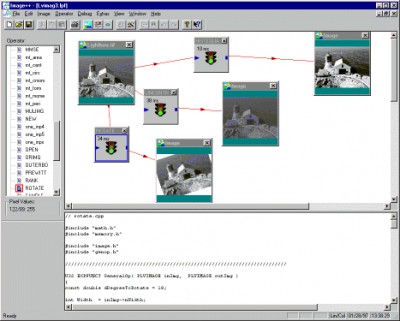
Firstly, the user finds a two-part graphic surface. The upper part assists the processing and visualization of image operations, the lower part allows the editing of the accompanying source codes. To perform an image operation, images and operators are loaded as elements of a so-called „operator graph". The positioning of the image- and operator-knots happens inter-actively and the connection between them represents the data flow of each working step, simply produced by „drag and drop" to the next knot. To save space, the pictures are shown at first on a reduced format of 128 x 128 pixel. A display in 256 x 256 or the original size is of course possible.
Operators, implemented as DLL
An operator-knot is implemented as a DLL (Dynamic Link Library), which acts as interface to the outside world. In a typical „Image++ DLL" an image processing routine like „Sobel", „FFT" or „Invert Image" is normally found. To make the user's choice easier, a list-selection element is to be found in each operator-knot with which a valid operator can be loaded.
Modifying, Adapting, Processing...
Apart from that, the operators are available as C++ files and can be infinitely combined with each other, modified or even rewritten. For this purpose, each selected operator is leaded and shown as a C++ code in a separate editing window in the lower half of the application. To test any modifications, a compiler can be started (in the latest version Image++ assists and supports Microsoft and Borland) without having to leave the environment, which produces a new, valid DLL, as long as no errors appear during compilation. This is shown as „Status Change" in the headline of the operator window. The new operator can now be directly per-formed onto an image. An animation shows you which operator is being performed.
32 Bit is ideal for Image Processing
Image++ and its associated operator DLLs are fully implemented and carried out in 32 bit. This leads to short performance times and practically infinite picture sizes. Shareware give Image++ a try. The manual also includes an introduction in image processing and data structures for image processing in C++. Data structures include the type image, vector and matrix. The result is an object-oriented, easily expandable software library for digital image processing and a collection of C++ classes. The documented source code is also included. (In the trial version we have only a view source files in C++ code, after registering you receive a password to a access the whole code).
Requirements
Limitations
tags image processing the user processing and object oriented source code digital image operator knot from version operator can data structures for image image and also included
Download Image++ 2.1

Purchase:  Buy Image++ 2.1
Authors software
 II_WorkSchedule 6.61
Image Integration
II_WorkSchedule is a useful electronic personal-management software for Companies.
 II_WorldTimeClocks 1.5
Image Integration
Get an overview of time in different countries.
 II_WorkLog4All 4.63
Image Integration
WorkLog4All is the Attendance recorder for small companies and businesses.
 II_WorkProjectPro 2.51
Image Integration
Keep track of how much time you spend doing different working projects.
 II_QuickMemo 1.5
Image Integration
II_QuickMemo application was designed to help you write notes and memos quickly.
Similar software
 Image Magician 1.4
Dr Magnell
Image Magician is a tool was designed as a graphic image editor.
Image++ 2.1
Image Integration
Image++ is designed to be an object-oriented graphic development tool.
 AVI-GIF 2.1
Byte-Soft Development
AVI-GIF is designed as simple batch graphic converter.
 Webgenz CMS 6.2.2
Webgenz
Webgenz CMS is a powerful, practical solution for front-end web development.
 GSA Image Analyser 4.5.3
GSA
The "GSA Image Analyser" is an application designed to analyse 2D-Images of any kind.
 IT Image Optimizer 1.01
IT Software
IT Image Optimizer is used to optimize pictures in most popular graphic formats.
 IT Image Resizer 1.5
It Software
IT Image Resizer is used to resize pictures in most popular graphic formats.
 Placer 3.17
Andrej Barkhatov
Placer is a useful and easy to use tool designed for image processing.
 AKS Image Comparer 1.0
AKS-Labs
AKS Image Comparer is a nice tool designed to allow you to compare two .
 Image Converter Pro 1.0
Green Point Software UK Ltd
Image Converter Pro is a powerful tool for converting, resizing and manipulating, graphic files.
Other software in this category
 PhotoPrint 3.4
fCoder Group International
PhotoPrint is a professional program that you can use for pre-print processing of large image collections.
 CoffeeCup GIF Animator 7.6
CoffeeCup Software
Easy-to-use tool for creating Web animations.
 Professor Franklins Instant Photo Effects 2.0
Streetwise Software
Simply select a category and browse previews of your photo with thousands of professional photo effects.
 CreaToon 3.0
ANDROME N.V.
Its main advantages are the ease of use and the real-time feedback.
 Ameri-Imager 2.0
ThinkTank Software
Ameri-Imager is a strong all-in-one software you can use for image conversion, editing, viewing and much more.

 RSS
RSS