WinSnap 6.2.3
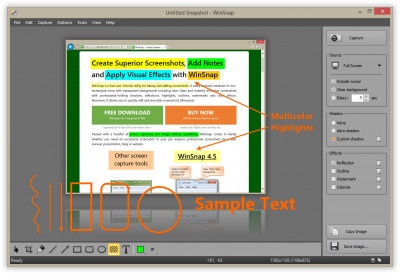
 Windows Snapshot Maker (shortly WinSnap) is a small enhancement utility for taking and editing screenshots.
|

 19.00
19.00  Shareware
 0K
0K
 Windows Vista
Windows Snapshot Maker (shortly WinSnap) is a small enhancement utility for taking and editing screenshots.
WinSnap automates all manual work and handle technical issues that previously you might perform only with Photoshop or other image editors. Initially, WinSnap was designed simply to take snapshots of non-rectangular windows, such as windows with XP visual styles, skinned media players, etc.
Now it is supplemented with professional smoothing shadows, coloring effects, canvas transformations, ability to automatically save images in various image formats and more.
WinSnap helps you easily make small thumbnail previews and full-sized screenshots for your web blog and home page, visualize technical and educational materials, send reduced-size images through email. You will perform professional screenshots immediatelly with one click!
WinSnap v2.x was especially designed for capturing the new Windows Vista UI. It can handle all possible issues with translucent window frames and rounded corners. WinSnap can draw a drop shadow effect which is very similar to the Aero theme.
Now shadows are semi-transparent! It allows really easy image compositing, and it is very useful when placing your screenshots on multi-colour backgrounds.
WinSnap v2.x allows you to select and capture multiple objects (e.g. windows, dialogs, buttons and controls) at once. Just place a few windows on the screen and easy combine them into one screenshot image.
You can quickly open screenshots in your favourite image editor using the Tools menu or shortcut keys. It also allows you to automatically save images into different directories and in different formats.
WinSnap features
NOTE: Registered users are able to download a Portable Edition of WinSnap. It is a special edition of WinSnap designed to run it from a removable media: USB flash drive, memory stick, iPod/MP3 player, network share, etc.
Limitations
tags allows you canvas transformations with one easy combine combine them and easy screen and them into one screenshot capture mode mode allows auto save advanced auto
Download WinSnap 6.2.3

Purchase:  Buy WinSnap 6.2.3
Authors software
WinSnap 6.2.3
NTWind Software.
Windows Snapshot Maker (shortly WinSnap) is a small enhancement utility for taking and editing screenshots.
Similar software
WinSnap 6.2.3
NTWind Software.
Windows Snapshot Maker (shortly WinSnap) is a small enhancement utility for taking and editing screenshots.
 Screenie 1.77
Screenie Software
Screenie is a lightweight but functional utility for taking screenshots of your Windows desktop.
 Easy Icon Maker 5.02
Icon-maker.com
Easy Icon Maker is a small and easy-to-use all-in-one icon utility for icon making, editing, changing, extracting, and searching .
 Screenshot Utility 1.0
QSX Software Group
Screenshot Utility is a screen capture program.
 QwikSpy 2.0
Hurkin.com
QwikSpy runs silently taking snapshot images of the desktop every few minutes.
 Able Video Snapshot 1.19.5.6
GraphicRegion.com
Able Video Snapshot is an application that allows you take snapshots directly from your movie!
This means you can go to any point within a video clip, capture a freeze frame picture, and save this image to your computers hard drive.
 1step MP3 to CD maker 2.0
MakeCD
With 1step MP3 to CD maker you can create your own audio-CD from MP3 files in one stepMakeCD is an elegant tool with which you can easily burn your favorite MP3 files to an audio CD.
 Web Page SnapShot 1.7
Tonec Inc.
The main purpose is to create a snapshot of a web page with URL.
 Cortona Movie Maker 1.0
ParallelGraphics
Cortona Movie Maker is an easy to use application for capturing video and creating screenshots from interactive animated 3D scenes.
 Apear Icon Maker 6.5
Pear Software
Apear Icon Maker is a small and easy-to-use icon-editing program.
Other software in this category
 Printkey-Pro 1.04
WareCentral
PrintKey-Pro is a system tray-based application which can capture
your screen or any part of it by pressing the PrintScrn key
(or any other key you configure).
 ScreenShot 2000
GutmannSoft
Using your Print Screen key, ScreenShot will capture your present screen and give you the options to save, modify, rename, display, email, copy and print your clipboard.
 JotSmart 1.1
Daily Toast Inc.
JotSmart software is the ideal utility to capture and mark up relevant information on your computer.
 ScreenFlash 1.7 build 0021
LuYi
If you want to build animated, interactive software tutorials in the shortest time, ScreenFlash is your best choice!
It is the easiest and most effective tool for demonstrating your software product, adding animations to your application's Help system, or training novices.
 CAPTUROV 1.0
Adrian Ivanov
Call Capturov and it will capture the complete screen and store it in a file called CAPTUROV.

 RSS
RSS