TweakWindow 1.5
 Even though TweakWindow has many analogs currently available for download on the Internet, no other window enhancement utility comes close to TweakWindow in terms of usability and number of features offered.
|

 21.00
21.00  Shareware
 0K
0K
 Windows XP/Vista
Even though TweakWindow has many analogs currently available for download on the Internet, no other window enhancement utility comes close to TweakWindow in terms of usability and number of features offered.
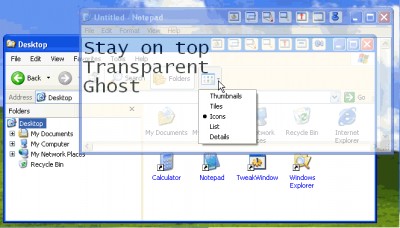
In addition to standard features, like hiding a window or making it topmost or transparent, TweakWidnow offers unique capabilities, like an option to change window icon or title so that no one can just come over and see what program you are running. One-click window minimization to the system tray is a great option for software applications that are automatically launched upon startup (like MS Outlook) but aren't currently used.
To maximize a window, simply click the application icon in the system tray. Another popular option not available in many window enhancement tools is a rollup feature that rolls the window up or down, leaving visible only its titlebar. Window ghosting is a feature that makes a window topmost and semi-transparent (users can adjust the transparency level themselves). All clicks will go through that window to the one located beneath, but the ghost window can still be closed, minimized, maximized and resized. Only ghost window title bar reacts to the mouse clicks. This is a great feature when you are running an application that you don't want others to see, but don't like hiding it entirely and need to be able access it immediately, when necessary.
All these window manipulations can be done easily one of three ways. First, you can use the buttons that the program adds to windows (this option can be turned on or off). Second, you can manipulate the windows through the window system menu. Finally, you can assign your own hotkeys that will trigger an action by simply pressing a combination of keys.
The program is extremely easy to download, set up and use. It requires absolutely no special skills or knowledge. And since TweakWindow is 100% FREE to download and try, you can start using it right now!
TweakWindow features
Limitations
tags the window more info you can you are the system title bar ghost window when you working with system tray into the use the its title
Download TweakWindow 1.5

Purchase:  Buy TweakWindow 1.5
Authors software
TweakWindow 1.5
AbsoluteWay
Even though TweakWindow has many analogs currently available for download on the Internet, no other window enhancement utility comes close to TweakWindow in terms of usability and number of features offered.
Similar software
TweakWindow 1.5
AbsoluteWay
Even though TweakWindow has many analogs currently available for download on the Internet, no other window enhancement utility comes close to TweakWindow in terms of usability and number of features offered.
 DU Super Controler 1.90
Zuka Software
Upload/Download limiter, prioritizes download when uploading at the same time.
 Printer Friendly 1.4
Antair
Antair Printer Friendly is an internet browser enhancement.
 Lightning Download 1.6
Headlight Software
Lightning Download is a Download Manager to help you download files from the Internet.
 DFX for Winamp2 and Winamp5 8.318
FXSOUND
DFX is an enhancement for the users of Winamp.
 Internet Image Hunter 1.1
www.graphichunter.com
Internet Image Hunter has a built-in IE core and is an easy to use Internet Browser.
 GogoL! 1.50
Victorovich Soft.
Audio enhancement plugin for the most popular media players like Winamp, Sonique.
 MediaImp 1.2
LifeSoft
MediaImp is a useful Internet Explorer plugin which notifies you about any multimedia files found on the Internet page and gives you the possibility to save the files to your hard disk, USB drive or even network folder with just a single mouse click! With MediaImp you can download various types of video and music files and also download Macromedia flash movies.
 U-Download 1.4.2
Unlimi-Tech Software, Inc.
U-Download is a web-based "download manager" that allows internet users to download multiple files with a click of a single button.
 Auto Window Manager 2.1
Eusing Software
Auto Window Manager will automatically manage every specified window.
Other software in this category
 Advanced StartUp Manager 2.0
Rayslab, Inc.
When Windows starts up, it automatically launches a number of programs for you.
 MIRV 2000 2.7
Gregory Braun
Do you have computer tasks that you perform on a regular basis that require more than one program to be active on the desktop?
If you do, then MIRV 2000 can help.
 Macro ToolsWorks 6.25
Pitrinec Software
Macro ToolsWorks is powerful all-in-one Windows automation utility that combines all features of Perfect Keyboard, MacroToolbar, WinScheduler and ClickyMouse programs.
 Smartcopy 3.1
Shareware Hangvogel
In Windows and Dos it will copy a file from your hard disk to your disk drive, in the case that the file size is bigger than the size available in your disk drive.
 HWT Split Master 1.7
HWTSoft
Are you annoyed for some files are too large to put on a floppy disk? If you have to split some large files or need to send files via email, in that way you need Split Master.

 RSS
RSS