FontMap 2.41
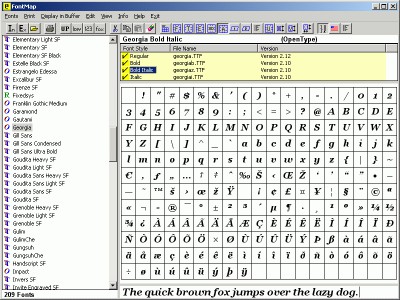
 FontMap may be used to view and print both installed and external fonts; it can display a variety of tables, individual characters, a keyboard view, font description, or whatever text you wish to enter.
|

 19.00
19.00  Shareware
 0K
0K
 Windows Vista
FontMap may be used to view and print both installed and external fonts; it can display a variety of tables, individual characters, a keyboard view, font description, or whatever text you wish to enter. Individual characters can be displayed in a "full-screen" view and custom table parameters can be set to "zoom" in on a selected portion of a font.
National character sets and unicode characters available for a font may also be displayed.
For an individual font most all of the views that are displayed can be printed - tables, text, keyboard view, font description, and installation or national character set information. Multiple fonts can be printed in either a brief or "verbose" format.
If you have a CD (or whatever) with a bunch of fonts on it, you can easily print a sample of all the fonts it contains without needing to install them. Or, you can browse thru the fonts and selectively install the ones you like.
For those of us who like to see characters in a larger format, FontMap can be used in place of CharMap. It may also be used as your default TTF viewer.
Note that printing, as well as the display of unicode and National character sets, is only available to registered users.
tags national character character sets may also you can the fonts font description individual characters keyboard view view font view and
Download FontMap 2.41

Purchase:  Buy FontMap 2.41
Authors software
FontMap 2.41
Gary Dix
FontMap may be used to view and print both installed and external fonts; it can display a variety of tables, individual characters, a keyboard view, font description, or whatever text you wish to enter.
 Look_At 1.05
Gary Dix
Look_At may be used to look at most any file; text, hex, character, and "interpret" views are available.
Similar software
FontMap 2.41
Gary Dix
FontMap may be used to view and print both installed and external fonts; it can display a variety of tables, individual characters, a keyboard view, font description, or whatever text you wish to enter.
 xp font viewer 2.2
xp font viewer co
xp Font viewer is a font utility.
 Font Manager 3.59
Alexander G. Styopkin
Font Manager is a manager that can view, print and install fonts.
 Font Man 1.0.5
Peach City Software
Font Man is an application for font management.
 FontTrax 2002.2
UniTech / MyTools.com
FontTrax is an application designed for font professionals or for anyone who uses fonts on a regular basis.
 Font Viewer 3.0
PurpleParrotPrograms
Font Viewer provides information about the screen and printer fonts installed on your computer.
 FontExpert 2006 8.0 Release 4
Proxima Software
FontExpert 2005 will let you manage and preview both installed and uninstalled typefaces, plus examine your system for font errors.
 Cfont Pro 2.5.0.0
Veign
Cfont Pro is a useful application which was developed as a way to manage fonts; to include system, printer, and currently uninstalled fonts.
 Font Printer 1.0
Karraker Computing Service
Font Printer is a program that allows you to see what fonts are installed in a system.
 FontSuit 2.8.3
Iseatech Workgroup
FontSuit is a useful and powerful font management tool, that allows you to easily and quickly group and activate / deactivate fonts in Windows XP, 2000, ME, NT, 98.
Other software in this category
 Typograf font manager 5.2.3
A. & M. Neuber GbR
Typograf font manager for OpenType, TrueType, PostScript Type 1 and printer fonts.
 Create Smooth Fonts 3.0
Ikitek
This program can convert your TrueType fonts so they will appear grayscaled on your screen.
 TTf Manager 3.7.81
jmberthier.com
TTf Manager is an application for managing your TrueType fonts.
Font Man 1.0.5
Peach City Software
Font Man is an application for font management.
 Advanced Font Viewer 5.15
Alexander G. Styopkin
The program's name itself shows what AFV can actually do.

 RSS
RSS