FlexiMusic Generator June 2002
 Generate usual and unusual musical sounds.
Generate usual and unusual musical sounds. Define your own instrument choosing various generator types and parameters of sound sources. Add multiple effects to it. Use it for your samples or save instrument file (encrypted with password) and distribute to other musicians like a sound font collection.
Features:
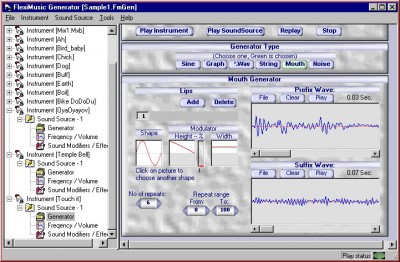
Six different types of sound generator sources are available. Sine, Graph, Wave, Mouth, String and Noise (These types are supported now, future versions will have more).
By defining few points and angle (called sine definitions), the complete waveform is created automatically using sine rule. Additionally you can have multiple sine definitions for the same sound making the sound to change gradually from one to other.
On this sine type you can apply changing frequency using frequency graph.
The basic simple sine wave sound for drums etc can also be produced in this.
This produces sound using graphs, where you actually draw the single cycle waveform shape (a small part of wave). If you know the wave shape of a particular instrument, you can draw that to produce the same instrument's sound. If an instrument's wave is changing from one shape to other shape, you can draw multiple graphs for different positions, for it to produce changing wave shapes sound.
In this, you can draw random line graph, and random point graph using menu.
Graph type Sound Source (indirectly using wave file): You can generate different sound based on an available beat wav file. This is to produce an artificial sound similar to a natural sound, where you have the freedom to modify it further. Using our wave editor, pick samples and copy that wave samples in to clipboard. Then bring that sample in to Sound Source using "insert Samples", Many graphs will be automatically drawn as per the samples picked. Here you will get somewhat similar sound of that beat of wav file, but made up of graphs (Graph type Sound Source).
.wav type Sound Source (directly from wav file):
Here you select and use an existing wav file. You can use part or full of that piece to play. By adding compensations to this wave's sound you can produce different sound using that wave sound.
Two type of frequency compensation can be applied to this,
Shrink/Expand (Midi Style): Like how the midi processes a patch, it can change the pitch/frequency as per the frequency graph. Since you are using graph for frequency compensation, you can make it changing up down from start to end.
Uses wave Markers: You make markers on that wave file and use it to stretch. In this case you can apply compensation (in addition to frequency) to width/length also by stretch graph.
Voice Processing: When voice wave file is used to make the "*Wav" type sound source, you can use them to compose a song, or you can apply multiple effects to modify that voice sound to produce different voice sounds.
This is a synthetic string sound generator. Here you define a pattern by choosing Envelop Shape and Wave Shape, sound is produced by applying Envelop to the wave shapes, further the envelop and wave shape are modulated for width and height.
You can define multiple pattern sets to produces sound varying from one shape to other. With in each pattern sets you can have single or multiple Envelop and wave shapes. You can choose these shapes from the no of available shapes or make your own.
Mouth type is to produces sound like multiple lips vibrating with different resonance synchronized to each other (like each sections of the vocal track). Additionally you can attach 2 small wave files as prefix and suffix. Animal sound also can be produced in this.
Here is a best noise Generator. There are 5 different types of noise can be produced. Multi frequency noise is produced. Noise frequency bandwidth can be set as needed. When noise follows the frequency graph and frequency range/limit very special noises come out. If you download this software remember open and try the sample noise sample.
For all these above 6 types of Sound sources you can have changing frequency and volume. These are input by graphs. So you can have a hi-frequency at the start and low frequency at the end, or changing up down to any at any position. Just draw, as you like. You can even create random graph to get different sounds. You also have scatter command to scatter the graph to give scattering frequency value.
To modify the above sound source further, these four Sound modifiers are available now; future versions will have more.
Equalizer:- with unlimited no of bands (You set the no of bands as you need).
Echo:- with multiple echo definitions.
Wave-On-Wave-Filter:- Effect to produce sound by adding frequency and amplitude modulation together. 3 choices of amplitude styles and 7 choice of frequency styles are available to produce various combinations.
Reverse:-You can apply reverse either full or selected part.
Sequence of applying these operations can be changed to manipulate different effects with different combination of sequences.
To produce rich music sound you define single Instrument using multiple "Sound Sources". Each Sound Source may be of different types and of different duration. They are merged to produce rich music Instrument. (for example, you can add a small pitch high volume sound at the starting of a beat, and a "tissh" sound at the end to make a beat rich). Many combinations are possible as per your imagination.
In merging of multiple Sound Sources in to Instrument you have the option of choosing whether you want the Sound Source to get mixed or to act as a filter to other Sound Sources. You can set how many percent to work as a filter and mow many percent to get mixed.
You can test play each item separately (looping or once). You can also use Real time play update (as and when you edit the sound it can automatically reprocess and play update sound).
You can save and open FlexiMusic Generator file (*.FmGen).
You can merge one file to other. You can also load s.ingle Instrument or Sound Source or from another file.
You can save played output in to wave format file (*.wav)
You can save encrypted read only Instrument file to distribute
tags you can sound source sound sources can apply wav file can have type sound wave shape produces sound can also can draw frequency graph wave file
Download FlexiMusic Generator June 2002
 Download FlexiMusic Generator June 2002
Purchase:  Buy FlexiMusic Generator June 2002
Authors software
 FlexiMusic Orchestra Mar2004
FlexiMusic.com
FlexiMusic Wave Editor is an audio editor very easy to use for professionals and home users.
FlexiMusic Generator June 2002
FlexiMusic.com
Generate usual and unusual musical sounds.
 FlexiMovie Composer 1.0
FlexiMusic.com
With FlexiMovie Composer you can produce your own movie or a slide show with your photos, video clips and voice recordings.
Similar software
FlexiMusic Generator June 2002
FlexiMusic.com
Generate usual and unusual musical sounds.
 guitar Instrument Tuner 1.01
PYXSYS-OOBOX
Guitar Instrument Tuner is a high precision real-time guitar tuner for your PC.
 EMS Data Generator 2005 for DB2 2.3
EMS Database Management Soluti
EMS Data Generator for DB2 is a powerful utility for generating test data to several DB2 database tables at once.
 In-Tune Multi-Instrument Tuner 1.97
Aspire Software
In-Tune Multi-Instrument Tuner is a useful program with the help of which you can tune your musical instrument quickly and accurately with this digital tuner.
 Keyboard Music 2.4
Xu Yi
Keyboard Music is a useful software that utilizes the keyboard of the computer in a playing musical instrument.
 Limouzik 2.0
La Pouge
Turn your PC into a musical instrument: midi polyphonic keyboard, with Limouzik application.
 Virtins Sound Card Signal Generator 3.9
Virtins Technology
Virtins Sound Card Signal Generator is a powerful PC based virtual instrument.
 MIDIView 1.1
Loopsoft
MIDIView is a utility to aid in previewing and printing MIDI files in musical notation.
 G-tune 2.50
JHC SoftWare
G-tune, our musical instrument tuning software, is now 6 years old.
 Extreme Password Generator Pro 1.5
Macro's Tools
EPG Pro is a password generator utility which allows users to generate strong, difficult to crack random passwords.
Other software in this category
 GuitarPower 1.2.9
JanaSoftware
GuitarPower - The Ultimate Chord, Scale and Arpeggio Reference for Guitarists.
 Any Recorder 3.60
Zjsoftware
Any Recorder is a very useful sound recording tool.
 Speak & Mail 2000.15
Shadi Shalabi
Speak & Mail allows your computer to "talk to you".
 BpmChecker 4.0
Shareware Hangvogel
Determine the tempo or BPM of a song or other piece of music with BpmChecker by manually tapping along with the music, using your pc keyboard.
 Mp3 Media Studio 3.0
ortam.com
Mp3 Media Studio is all-in-one MP3 organizer for converting audio CDs to MP3 and WAV format using CDDB (Internet Compact Disc Database), editing ID3 tags, converting Wav to Mp3 files and Mp3 to Wav files, managing M3u playlists, renaming files using ID3 tags, searching for duplicate Mp3 files, searching and cataloging Mp3 files into Mp3 library, listening Mp3's using your favorite Mp3 player, and much more.

 20.00
20.00  Shareware
 0K
0K
 Windows Vista

 RSS
RSS