Ashampoo Magical Snap 2.0
 Ashampoo Magical Snap is a screen capture tool with powerful and intuitive editing capabilities.
|

 14.00
14.00  Trial
Trial 0K
0K
 Windows XP/Vista
Ashampoo Magical Snap is a screen capture tool with powerful and intuitive editing capabilities. It enables you to capture virtually anything on your screen – all or part of program windows, websites, the desktop and anything else displayed on your computer’s monitor. Then you can use the editing tools to enhance the screenshot and turn it into a really attractive image.
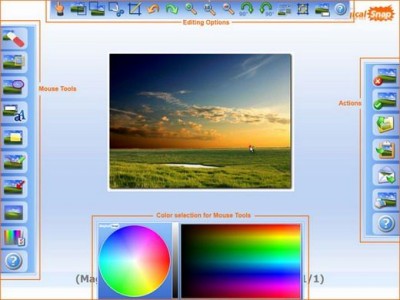
Interactive guides show you how to perform every operation. All features are also so simple to use that you can get results really fast. For example, the unique Mouse Tools editing tools display their options next to the mouse pointer so that you don’t have to search in menus. You have to try it to appreciate it, Mouse Tools are truly cool and make image editing amazingly easy!
Scrolling Window Capture
The latest version of the popular Ashampoo Magical Snap screen capture program introduces a radical improvement: The ability to capture all the contents of a Window, including the parts that are currently scrolled off screen. This is something that most capture programs are incapable of and it is achieved with an advanced new capture technology.
Scrolling window capture works both with the content of web browsers and the content windows of most application programs. Using it couldn’t be easier – you just select the window to capture and Ashampoo Magical Snap 2 automatically “scrolls” the window contents into a single captured image.
Multiple monitor support
Another major improvement is full support for capturing images on systems with multiple monitors. Many other screen capture programs cannot do this or produce unsatisfactory results. Ashampoo Magical Snap 2 automatically identifies multi-monitor systems and captures screenshots perfectly from any monitor.
Improved image editing with new tools
The editing capabilities of the new version have also been thoroughly updated and enhanced. Now you can turn your screenshots into professional-looking images in no time.
Enhancements here include new functions (Flip, Mirror, Drop Shadow, Grayscale, Pencil), new and improved Mouse tools (Callout, Line, Highlight Area, Marker, Select, Draw Text, Arrow, Eraser), radically improved print support (DPI settings, large images, wide desktops, entire websites etc.) and new capture effects that you can apply on the fly while capturing your screenshots.
Enhanced usability and user interface
Ashampoo Magical Snap 2 is also easier to use than ever, with a much more powerful and intuitive user interface. Almost every aspect of the program has been overhauled. Improvements include better support for multiple captures, more hotkeys, better zoom and scroll features (mouse
tags ashampoo magical magical snap you can that you mouse tools screen capture the content new capture the window support for user interface your screenshots capture programs
Download Ashampoo Magical Snap 2.0
 Download Ashampoo Magical Snap 2.0
Purchase:  Buy Ashampoo Magical Snap 2.0
Authors software
Similar software
Ashampoo Magical Snap 2.0
ashampoo GmbH & Co. KG
Ashampoo Magical Snap is a screen capture tool with powerful and intuitive editing capabilities.
 Ashampoo Magical Optimizer 1.2
ashampoo GmbH & Co. KG
Ashampoo Magical Optimizer erases stagnant and unnecessary files from the hard drive, deletes Internet tracks.
 Ashampoo AudioCenter 1.70
ashampoo GmbH & Co. KG
The Ashampoo AudioCenter is the control center for extracting, burning, converting, editing and repairing of audio files!
Ashampoo AudioCenter is a tool that allows you extract from audio files.
 Ashampoo SnapYa! v. 1.5.3.3 SE
ashampoo GmbH & Co. KG
You just want to create fantastic screenshots from the desktop and send them to friends or colleagues?
No problems! With Ashampoo SnapYa! you will create screenshots with amazing effects with just a few clicks.
 Super Screen Capture 6.1
ZeallSoft
Super Screen Capture is a useful and an all-in-one software for screen capture.
 Ashampoo Security Pack 1.00
ashampoo GmbH & Co. KG
Ashampoo Security Pack is the control, installation and launch centre for all your Windows security needs.
 Ashampoo BurnYa! AudioCD 2.6
ashampoo GmbH & Co. KG
Ashampoo BurnYa! AudioCD 2 enables you to burn your favourite songs with just a few clicks to audio CDs.
 CyberLink PowerProducer 6
CyberLink Corp.
Designing stunning DVDs is now a snap with intelligent DVD authoring software CyberLink PowerProducer Encore.
 Capture Studio 2.6
FLISoft
Capture Studio is a screen capture and image editing tool that can auto-scroll and view web pages, or other documents, when capturing.
 2CaptureEasy 1.1
Computing Software
2CaptureEasy is a screen capture or print screen tool that lets you to capture a part of your screen including or excluding the cursor.
Other software in this category
 Printkey-Pro 1.04
WareCentral
PrintKey-Pro is a system tray-based application which can capture
your screen or any part of it by pressing the PrintScrn key
(or any other key you configure).
 ScreenShot 2000
GutmannSoft
Using your Print Screen key, ScreenShot will capture your present screen and give you the options to save, modify, rename, display, email, copy and print your clipboard.
 JotSmart 1.1
Daily Toast Inc.
JotSmart software is the ideal utility to capture and mark up relevant information on your computer.
 ScreenFlash 1.7 build 0021
LuYi
If you want to build animated, interactive software tutorials in the shortest time, ScreenFlash is your best choice!
It is the easiest and most effective tool for demonstrating your software product, adding animations to your application's Help system, or training novices.
 CAPTUROV 1.0
Adrian Ivanov
Call Capturov and it will capture the complete screen and store it in a file called CAPTUROV.

 RSS
RSS