HelpScribble 7.8.3
 HelpScribble is a useful, full-featured and easy-to-use help authoring tool for creating help files from start to finish.
|

 99.00
99.00  Demo
Demo 0K
0K
 Windows Vista
HelpScribble is a useful, full-featured and easy-to-use help authoring tool for creating help files from start to finish.
Create WinHelp (.hlp) files, HTML Help (.chm) files, a printed manual and online documentation (on a web site) all from the same HelpScribble project.
Write full-featured help files with the built-in editors for SHG files (hotspot bitmaps), WinHelp macros, contents tree, browse sequences, etc.
If you have previously used another help authoring tool, reuse your work by importing the HPJ+RTF files created with the other tool or by a decompiler.
Use the help files you make with HelpScribble to provide context-sensitive help with your Window applications, no matter which development tool you use. If you use Borland Delphi or C++Builder, you will like the way HelpScribble's HelpContext property editor integrates with them to make assigning Topic ID values to HelpContext properties very easy.
HelpScribble is a stand-alone tool. It does not depend on MS Word or any other third party package. It does need a help compiler that you can download for free here.
HelpScribble features
Writing Help Files is EasyA help file consists of a series of topics. A topic is a single page in the help file. When you press F1 in a Windows application, you will be shown one topic from its help file. Each topic generally explains one specific aspect of the application: a menu item, a small dialog box, etc. Most topics contain links to other topics which provide information about related aspects of the application.
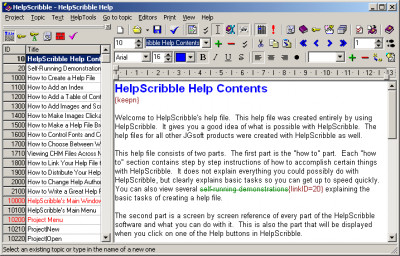
In HelpScribble, you can create new topics by selecting Topic|New from the menu. Then you use HelpScribble's built-in word processor to type in the topic's text. To create a link to another topic, simply right-click on that topic in the list at the left, and pick "Create Link" from the pop-up menu. That is all there is to creating a help file.
A useful strategy is to first create all the topics using Topic|New. Type in their titles, but do not type in the actual text yet until all topics have been created. By first creating empty topics, you can focus on the general structure of the help file. When that is done, you can focus on the content of the individual topics. This also makes it easy to create links between topics while writing the body text, since you will have already created all topics.
How To Provide Context-Sensitive Help
with Your SoftwareWindows applications request help by referencing a help file and a numeric topic ID. In the screen shot above, you will see that each topic in the list has a number. This is the number your application will use to request help.
Often, the programmer responsible for linking the application and the help file is not the technical writer using HelpScribble to create the help file. HelpScribble allows the writer to save the list of topics, with their titles and numbers, to a file. The list can also be printed from within HelpScribble. The programmer can then use this list to add the context-sensitive help calls.
A help file created with HelpScribble can be used as documentation with any Windows application, no matter which development tool you use. The most basic way to request help, context-sensitive or not, is to use the WinHelp() Windows API call. The fourth parameter of this API function is where you will put the Topic ID from HelpScribble. If you want to use the HTML Help format, use the HTMLHelp() API call.
Things are much easier when you use some kind of visual development tool. With most of these tools, all controls have a property called HelpContext, HelpID, or something similar. Set this property to the appropriate Topic ID from HelpScribble. When the user presses F1, the HelpContext number from the control that has input focus will be used to determine which help topic will be displayed.
Almost all Win32 development tools support WinHelp. Some also support HTML Help. .NET (dot net) development tools only support HTML Help. But HelpScribble fully supports both, and allows you to easily switch between both formats. When you download HelpScribble, you will see that we included its help file in both WinHelp and HTML Help format.
Limitations
tags help file you will you use use the html help the help help files the list context sensitive you can from the request help when you
Download HelpScribble 7.8.3

Purchase:  Buy HelpScribble 7.8.3
Authors software
 PowerGREP 4.5.0
JGsoft - Just Great Software
PowerGREP is a powerful grep tool for quickly searching for a piece of information through files and folders on your computer, such as software source code, letters and correspondence, server or system logs, reference texts, historic archives, etc.
HelpScribble 7.8.3
JGsoft - Just Great Software
HelpScribble is a useful, full-featured and easy-to-use help authoring tool for creating help files from start to finish.
 EditPad Pro 8.1.2
JGsoft - Just Great Software
EditPad Pro is a powerful and versatile text editor or word processor, designed to make text editing as convenient as possible.
 RegexBuddy 3.6.1
JGsoft - Just Great Software
RegexBuddy is your perfect companion for working with regular expressions.
 AceText 3.1.1
JGsoft - Just Great Software
AceText is a text manager.
Similar software
HelpScribble 7.8.3
JGsoft - Just Great Software
HelpScribble is a useful, full-featured and easy-to-use help authoring tool for creating help files from start to finish.
 KoolMoves 10.1.9
Lucky Monkey Designs
KoolMoves is an affordable Flash authoring tool that is full featured and easy to use.
 WinCHM Pro 3.34
Create help files
WinCHM Pro is an easy-to-use HTML help authoring software that can help you create help files more easily and quickly.
 Enhanced HTML Editor 4.4.7
John Hibbins
Enhanced HTML Editor is a powerful, fully featured web-authoring tool that will help you create, publish and update your web pages within a matter of hours.
 ExamView Assessment Suite Professional Edition 5.2
FSCreations, Inc
Streamline assessment from start to finish with ExamView Assessment Suite Professional Edition, a complete toolset in three seamless applications.
 MakeCDROM 4.3
KillerSoftware LLC
MakeCDROM is a useful and full-featured visual authoring package for building interactive multimedia (autorun) menus for presentations that appear automatically when your CD-ROM gets inserted into a drive.
 Ulead DVD Workshop 2.0
Ulead Systems GmbH
Ulead DVD Workshop 2 is designed for professional video editors and enthusiasts who want a powerful yet intuitive authoring tool to create full-featured professional DVDs.
 DivX Author 1.5
DivX Networks
DivX Author is a full-featured DivX authoring program, allowing you to create videos and slide shows that take advantage of the advanced features of DivX including interactive menus, chapters, multiple subtitles and audio tracks.
 E.S.T Help Author Pro 1.65
MaxComponents
Do you need to create help documents for your applications?
If your answer is yes, our new help authoring system is the best application you need.
 DLL Designer 2.3
DLL Designer Team
DLL Designer is a full-featured authoring product designed specifically for producing Dinamic Link Libraries (DLL) for Windows 95, 98, and NT/2000/XP.
Other software in this category
 HelpBuilder 4.01.000
GPP Software
HelpBuilder is a tool which creates and maintains Windows Help files.
 HelpWriter 1.0
Asele Service Center
HelpWriter is an help file editor.
 AnetHelpTool 6.10
Anet Soft, Llc.
AnetHelpTool is WYSIWYG help-authoring system for creating Win/HTML/Java Help files, RTF Manuals and Web sites.
 WebExe 1.61
Andreas Wulf Software
WebExe converts a single HTML page, or group of pages, into one single, self-running EXE file with an integrated browser.
 VBdocman 2.25
Helixoft
VBdocman is a program for automatic generating of technical documentation from your Visual Basic source files with just few mouse clicks.

 RSS
RSS