CopyFilenames 3.3
 CopyFilenames is a useful extension for Windows Explorer.
|

 9.00
9.00  Trial
Trial 0K
0K
 Windows XP/Vista
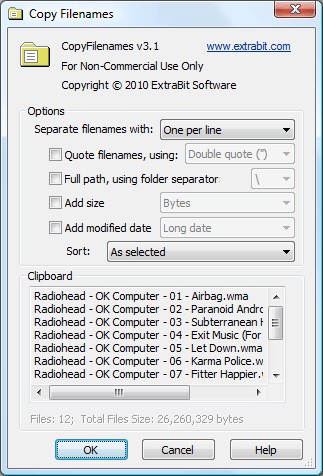
CopyFilenames is a useful extension for Windows Explorer. It cannot be run as a standalone application. After installing CopyFilenames, right click on one or more files or folders in Windows Explorer and you will see the extra commands added by CopyFilenames.
Windows has no built in way to copy a filename or folder listing to the clipboard. For a single file, you can use File > Rename, CTRL+C, then ESC to copy a filename to the clipboard, but this is quite tedious if you have to do this frequently or for lots of files.
CopyFilenames comes to the rescue! This adds an extra menu command to the context menu in Windows Explorer (this is the menu that pops up when you right click on a file). This command lets you copy the filename in one operation.
CopyFilenames can also be used to copy lots of filenames all in one go. By default, the filenames will be copied one per line.
When any folders are selected, you have the option to copy the names of all the files in the folders instead of the names of the folders, to whatever depth you want.
CopyFilenames features
Limitations
tags windows explorer add file full path filenames with the folders copy the right click the clipboard you have the names
Download CopyFilenames 3.3

Purchase:  Buy CopyFilenames 3.3
Authors software
 RenameMan 4.3
ExtraBit Software
RenameMan is a very quick and easy to use application for both experienced and occasional users.
 SpaceMan 99 4.1
ExtraBit Software
SpaceMan 99 is an utility to help organize files and manage disk space.
CopyFilenames 3.3
ExtraBit Software
CopyFilenames is a useful extension for Windows Explorer.
Similar software
CopyFilenames 3.3
ExtraBit Software
CopyFilenames is a useful extension for Windows Explorer.
 Context Menu Extension DLL 3.1
Dmitry Miloserdov
The Context Menu Extension DLL is a very easy way to add Windows Explorer context menu extension (like WinZip) into your own software applications.
 DzSoft Slide Show 2.0.0.2
DzSoft Ltd
DzSoft Slide Show is a Windows shell extension that allows you to view groups of images as a slide show instantly from Windows Explorer - just select them and choose an appropriate item of the context menu.
 Extension Killer 1.0
Spider-Bit
E.
 Print File List Pro 1.0.12
Insaneware Solutions
Print File List Pro provides missing functionality for Windows Explorer: the ability to print the file list or directory tree for any window.
 Context ThumbView 1.8.6
ContextMagic.com
Context ThumbView is a Windows Explorer context menu extension that will provide image preview directly in the right-click menu.
 PHP Serial Extension 20160108.1
Cosmin Buhu
PHP Serial Extension is a loadable extension for PHP running on Windows implementing serial port handling and communications.
 Tangelo 1.5 Public Beta
bradrhine.com
Instead of installing or using weblog software on an Internet web server, Tangelo is installed on the user's PC as a standalone program, providing much easier installation, greater weblog control, and ease of use.
 Shell Reset 1.2.0.161
Shell+ Development Group
Debugging of Shell extensions is a simple process.
 FolderJump 1.5
Leonid Belousov
The Master Cluster's FolderJump is a simple and handy extension for the standard context menus of Windows Explorer and Open/Save Dialogs.
Other software in this category
 Virtual Desk 1.2
Easyfp.com
Virtual Desk is an award-winning virtual desktop manager that gives you the possibility to have multiple virtual desktops (just like many screens) and you can have different windows and applications running in each desktop.
 Desktop Dreamscapes 1.0
Super X Studios
Replace your static desktop with a living, 3D window into outer space! Visit distant star systems, beautiful alien worlds, even a black hole.
 WinRider 2.0
Anibisoft, Inc.
WinRider is a nice program, which scrolls your colored slogan or text on your desktop wallpaper.
 Windows Hider Pro 1.51
KMiNT21 Software
Windows Hider allows you to hide specified groups of windows just by pressing a single Hotkey (or a combination of Hotkeys).
 Replacement of Wall-paper 3.0
Ya-Soft
Replacement of Wall-paper (ROW)- one of the best wallpaper manager for Windows.

 RSS
RSS