ComfortAir HVAC Software 4.0
 ComfortAir HVAC software is created to be used by engineers, architects, contractors and energy auditors to calculate and analyse heating and air conditioning loads in commercial buildings.
|

 389.00
  Demo
Demo 0K
0K
 Windows Vista
ComfortAir HVAC software is created to be used by engineers, architects, contractors and energy auditors to calculate and analyse heating and air conditioning loads in commercial buildings.
Input and output units can be set independently to English or Metric units. The program contains weather and other necessary data for 1,071 cities and localities in 110 countries, thus making it applicable for virtually any location in the world.
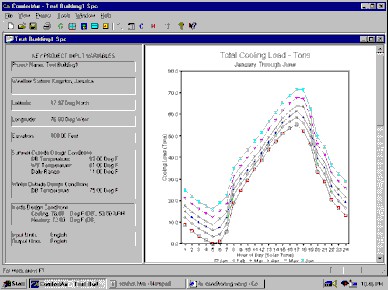
Program output includes tables and graphs of cooling loads (load profiles) for all hours of the day and for all months. It also provides summary reports for peak conditions and a host of other useful information, such as reports and graphs of glass shading, from external shading devices like fins and overhangs.
An example of how the hourly load tables can be useful, is in the design of thermal storage air conditioning systems, where ton-hour (kilowatt-hour) calculations have to be made in order to size the storage systems.
ComfortAir HVAC Software features
Units Flexibility - ComfortAir is probably the only software of its kind that can be configured to work in either English or Metric units. The user only has to select the preferred units from the Options menu to configure the application according to his or her requirements. Furthermore, input units and output units can be selected independently, thus allowing users to work with the input units of their choice, and then generate output reports, tables and graphs in whatever units their clients prefer. International consultants will love this flexibility.ComfortAir is User-Friendly and Powerful - Another noteworthy feature of ComfortAir is its user-friendliness, which is the result of several factors:
Context-Sensitive Help - ComfortAir has the standard context-sensitive Help system, which on the click of a button, provides the user with ready information on the action currently being taken. The information provided by the Help system is also illustrated by diagrams where appropriate, to further promote the user friendliness of the application. The Help system also provides quick start information and a handy tutorial to teach new users how to use the software quickly and effectively.
ComfortAir is Applicable Worldwide - ComfortAir contains weather and other necessary data for 1,989 cities and localities in 163 countries across the globe. This means that the application can be used for virtually any location in the world. The user only has to click on the name of the city in which the project building is located and all the necessary data for that city becomes available and automatically used in the calculations.
Load Calculation Methodology - The load calculation methodology used by ComfortAir, is based on ASHRAE's CLTD/CLF method, which uses cooling load temperature difference and cooling load factors. Note that ComfortAir is a single-zone application. If the project building consists of more than one zone, the application is run separately for each zone.
Requirements
Limitations
tags the user air conditioning the application necessary data the day and graphs data for cooling load hourly load help system with the hour kilowatt user friendliness
Download ComfortAir HVAC Software 4.0
 Download ComfortAir HVAC Software 4.0
Purchase:  Buy ComfortAir HVAC Software 4.0
Authors software
ComfortAir HVAC Software 4.0
Baltik Engineering
ComfortAir HVAC software is created to be used by engineers, architects, contractors and energy auditors to calculate and analyse heating and air conditioning loads in commercial buildings.
Similar software
ComfortAir HVAC Software 4.0
Baltik Engineering
ComfortAir HVAC software is created to be used by engineers, architects, contractors and energy auditors to calculate and analyse heating and air conditioning loads in commercial buildings.
 JobCost Controller for Excel 11.1
CPR International, Inc.
Construction Jobcost Tracking System for Excel.
 Energy Conversion with Plots Spreadsheet 1.1
Engineering Software
 Easy Time Tracking PRO 6.0.8
Logic Software Inc.
Easy Time Tracking is a FREE, strong and extremely easy-to-use time management and customer billing application.
 CADopia 6.2.36
CADopia Inc
CADopia is the perfect CAD tool for students, architects, educators, designers, drafters, and engineers - virtually anyone who creates or uses CAD drawings.
 GeneralCost Estimator for Excel 18.0
CPR International Inc
General Construction Cost Estimating System for Excel helps you save time and money while increasing your bidding success
Designed specifically for contractors, builders, cost estimators, architects and construction professionals.
 Shadow Analyzer 2.2.1.1.1
Dr. Baum Research e.K.
Shadow Analyzer is an advanced parametric CAD tool for professionals in the area of Solar Energy Engineering and Architecture.
 BuildersPal 1.1
Chemuturi Consultants
BuildersPal is a program aimed at assisting the construction industry.
 Energy Spy 1.8
FlexibleSoft Co.
Energy Spy is a useful application created to schedule a shutdown, reboot, logoff, poweroff, standby, and hibernate a certain time on the local.
 DWG2ZIP 2005
Dwg2zip.com
Dwg2zip is used by architects and engineers all over the world to make AutoCAD drawings ready to share with project participants.
Other software in this category

 WinNavigator 1.96
WinSoft
WinNavigator is a powerful and easy to use file manager.
 CuteZIP 2.1 Build 10.26.1
GlobalScape
CuteZIP offers superior ease-of-use, plus powerful security and archiving features for the most versatile compression utility on the market.
 Electrical Calculations 2.70.0.4
L.M. Photonics Ltd
Electrical Calculations software provides calculations for busbar and cable ratings, static and bulk power factor correction, motor starting currents and curves, enclosure ventiation, transformer calculations and many metric / imperial conversions and constants.
 mmSensitivity 2.07
MM&Soft Personal Service
Sensitivity Analysis add-in for Microsoft Excel 97, 98, 2000, and 2001 for Windows.

 RSS
RSS