XP Icons 3.0
 Give your Win98/Me/Win2k System icons the look of XP by changing your Start menu, Drives, Desktop, Folders and various file type icons to XP.
|

 19.00
19.00  Shareware
 0K
0K
 Windows Vista
Give your Win98/Me/Win2k System icons the look of XP by changing your Start menu, Drives, Desktop, Folders and various file type icons to XP.
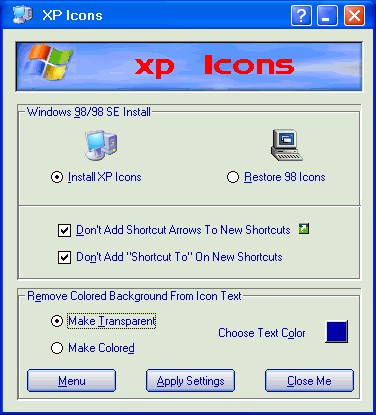
XP Icons changes nearly 100 Win98/98SE/Me and Win2k system icons to the new Windows XP Icons Set. Version 3 now allows installing the complete set or changing over 60 Windows System icons individually with your choice of over 140 XP icons included with the program or any other you may have.
Also includes options to remove shortcut arrows, 'Shortcut To' prefix and colored block behind the Desktop Icon text. Also allows choice of Desktop Icons text colors.
tags system icons win2k system
Download XP Icons 3.0

Purchase:  Buy XP Icons 3.0
Authors software
XP Icons 3.0
Camtech 2000, Ltd.
Give your Win98/Me/Win2k System icons the look of XP by changing your Start menu, Drives, Desktop, Folders and various file type icons to XP.
Similar software
XP Icons 3.0
Camtech 2000, Ltd.
Give your Win98/Me/Win2k System icons the look of XP by changing your Start menu, Drives, Desktop, Folders and various file type icons to XP.
 E-Icons 4.15
Giovanni La Sala
E-Icons helps you to replace any of the standard Windows 9x/ME/2/XP icons in an easy way.
 Bee Icons 4.0.3
ArcticLine Inc
Bee Icons is a reliable program which allows you by means of only several mouse clicks to replace a lot of shell icons to those ones you do like.
 CustomIcons 4.3
Aha-soft
CustomIcons is an ultimate tool for customizing the icons on your desktop, in Windows Start menu, for your folders and many other locations.
 Fk Desktop 3.017
Farkas Software
Why do you have only one desktop, if you can have as many as you wish? If you have installed a lot of applications, surely your desktop is full with icons and shortcuts to different archives and folders.
 Magic Desktop 11 MAX
Pear System
Magic Desktop enables you to customize the Windows interface and Windows logon screen, transparency Windows task bar.
 VividSwitcher 2.2
Miller4 Designations
VividSwitcher is a novel software for changing screen resolution.
 Fast Folder & Command 1.0
Wpg Software Inc.
Fast Folders is a shell enhancement which will give you rapid access to your most used folders in Common Open/Save dialogs, the desktop and in Explorer.
 Buddy Icon Grabber 1.04
Icon Grabber Team
Buddy Icon Grabber is a 32 bit utility designed to scan the directories and drives on your computer and extract all icons it finds inside of all exe, dll, scr, ocx, ico, and icl files.
 Easy Desktop Keeper 10.0
Ixis Ltd
Easy Desktop Keeper gives you the ability to save, restore, manage and lock your desktop layout including files and folders located on your desktop, placement of desktop icons, desired wallpaper and screen saver.
Other software in this category
 Alive! Icons 1.5
Yavsoft
Alive! Icons presents an elegant solution for animated icons in window headers and Windows taskbar.
 IconPump 1.5
Codexcel - Tailored Software
Icon Pump is a strong icons extractor program.
 Iconic Tray 1.21
dnSoft Research Group
Iconic Tray is a small progrram that allows you minimize any window either to the system tray (notification area - Windows XP), or to a special new tray provided by Iconic Tray.
E-Icons 4.15
Giovanni La Sala
E-Icons helps you to replace any of the standard Windows 9x/ME/2/XP icons in an easy way.
XP Icons 3.0
Camtech 2000, Ltd.
Give your Win98/Me/Win2k System icons the look of XP by changing your Start menu, Drives, Desktop, Folders and various file type icons to XP.

 RSS
RSS