PropertyEditor 5.0
 PropertyEditor is a shell extension for Windows Explorer that allows you to customize desktop icons and context-menu of each folder, file and drive you choose.
|

 29.00
29.00  Shareware
 0K
0K
 Windows Vista
PropertyEditor is a shell extension for Windows Explorer that allows you to customize desktop icons and context-menu of each folder, file and drive you choose.
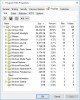
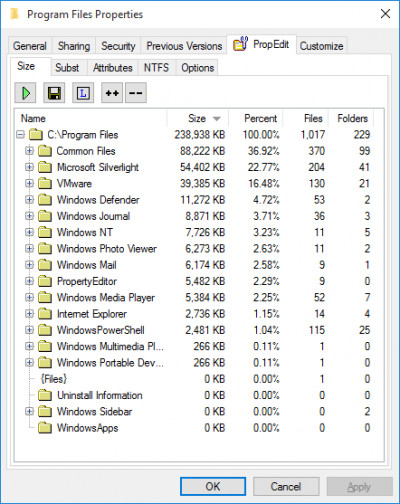
PropertyEditor allows you to create detailed reports about the size of any drive or folder on your PC.PropertyEditor is a tool that can modify the parameters of files.
This information helps you analyze usage of your hard drives and keeps your data well organized.
With PropertyEditor you can see and edit some very useful hidden features of NTFS (file system of Windows NT/2/XP), such as Streams, Junctions, Hard Links and Mount Points.
Windows 2 introduces the Encrypting File System (EFS) so that users can protect their sensitive data (Windsows XP supports encryption too).
PropertyEditor lets you see who has access to encrypted files.
Also with PropertyEditor you may modify the date and time that a file or folder was created, last accessed, and last modified, as well
PropertyEditor allows you easy to modify attributes of files, folders and drives (including attributes, which you will not be able to change in Explorer).
Unicode support is added.
Improved interface.
"Options" page is moved to context menu of "TreeSize", "Menu" and other pages.
Page "TreeSize"
You can set up processing of Junctions and Mount Points.
Increased speed up to 10 times.
Page "Menu"
More convenient interface
Page "NTFS"
Subst: You can see all mounted drives with target path.
Links: You can find all hard links for selected hard link.
Streams: You can see all system streams and their type.
Encryption: You can see encryption information for folders.
New page "Search": You can find all links on your local drives.
Page "Icons"
You can change icons for all drives.
Page "Attributes"
NTFS attributes are separated from global attributes.
The folder Info Tip is moved to this page.
tags you can can see allows you mount points see all can find drives page find all and mount file system with propertyeditor modify the propertyeditor you
Download PropertyEditor 5.0

Purchase:  Buy PropertyEditor 5.0
Authors software
 Print Censor ME 1.0 Final
UsefulSoft
Print Censor ME is a very simple in use program for management of statistics of printed jobs on the printers, used on Your computers.
 Print Censor Personal 5.50.199
UsefulSoft
Print Censor Personal is an application for management of statistics of printed jobs on the printers.
PropertyEditor 5.0
UsefulSoft
PropertyEditor is a shell extension for Windows Explorer that allows you to customize desktop icons and context-menu of each folder, file and drive you choose.
 PrintGhost 1.1
UsefulSoft
Looking for a way to save money on ink and paper? Need a poster printing feature? Want an affordable virtual printer? Check out PrintGhost.
 Print Censor Professional 4.8 build 146 Release Candidate 2
UsefulSoft
Each time your employee prints a document, it costs your business anywhere between 1 and 5 cents, depending on paper format, type of printer, number and "amount" of colors used and so on.
Similar software
PropertyEditor 5.0
UsefulSoft
PropertyEditor is a shell extension for Windows Explorer that allows you to customize desktop icons and context-menu of each folder, file and drive you choose.
 Context Menu Extension DLL 3.1
Dmitry Miloserdov
The Context Menu Extension DLL is a very easy way to add Windows Explorer context menu extension (like WinZip) into your own software applications.
 IconSaver 2.2
Mario Knok
IconSaver is a small Windows tool that saves and restores icons' positions on the Desktop window.
 Context ThumbView 1.8.6
ContextMagic.com
Context ThumbView is a Windows Explorer context menu extension that will provide image preview directly in the right-click menu.
 Shell MegaPack ActiveX 2012
Sky Software
Shell MegaPack ActiveX brings drop-in Windows Explorer shell browsing functionality to your application.
 ABF Favorite Folders 1.31
ABF software, Inc.
ABF Favorite Folders will allow you to easily store, manage and access a list of frequently used folders.
 DzSoft Slide Show 2.0.0.2
DzSoft Ltd
DzSoft Slide Show is a Windows shell extension that allows you to view groups of images as a slide show instantly from Windows Explorer - just select them and choose an appropriate item of the context menu.
 CCM Wizard 3.1
DNTSoft
CCM Wizard will allow you to customize the available right click options in the context menu of files, folders or desktop.
 Shell Menu 1.0
Softery Inc
Shell Menu is a Dreamweaver extension horizontal menu.
 Bee Icons 4.0.3
ArcticLine Inc
Bee Icons is a reliable program which allows you by means of only several mouse clicks to replace a lot of shell icons to those ones you do like.
Other software in this category
 Advanced StartUp Manager 2.0
Rayslab, Inc.
When Windows starts up, it automatically launches a number of programs for you.
 MIRV 2000 2.7
Gregory Braun
Do you have computer tasks that you perform on a regular basis that require more than one program to be active on the desktop?
If you do, then MIRV 2000 can help.
 Macro ToolsWorks 6.25
Pitrinec Software
Macro ToolsWorks is powerful all-in-one Windows automation utility that combines all features of Perfect Keyboard, MacroToolbar, WinScheduler and ClickyMouse programs.
 Smartcopy 3.1
Shareware Hangvogel
In Windows and Dos it will copy a file from your hard disk to your disk drive, in the case that the file size is bigger than the size available in your disk drive.
 HWT Split Master 1.7
HWTSoft
Are you annoyed for some files are too large to put on a floppy disk? If you have to split some large files or need to send files via email, in that way you need Split Master.

 RSS
RSS