Multi Screen Emulator for Windows 2.0.2
 Multi Screen Emulator for Windows (MSEW) helps to solve this problem and arranges all these windows on virtual screens to get rid off any disorder and chaos on your Windows desktop.
|

 14.00
14.00  Shareware
 0K
0K
 Windows Vista
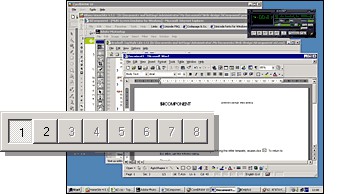
Multi Screen Emulator for Windows (MSEW) helps to solve this problem and arranges all these windows on virtual screens to get rid off any disorder and chaos on your Windows desktop. MSEW creates up to eight virtual screens and each of them can be used for specific aims. For example, you can launch all working tools such as text editors, spreadsheets and engineering tools on the first screen; use the second one for launching games and the third one to launch slideshow or CD-player with pleasant music. Switching of the virtual screens can be performed by using MSEW panel or by hot keys. This can be explained on small example:
You can run any applications while running under the first desktop. Click the 2 button to switch to the second desktop:
Switching desktops (before and after)
Now you have a brand-new desktop where you can start other applications.
When you are switching between desktops, all applications that are running in chosen desktop appear with restored positions. Desktop navigation is realized by pressing specified button on the MSEW panel. The MSEW panel can be dragged to any desktop corner by holding mouse button down on panel outside the buttons.
You can see the preview of specified desktop and all applications running on it by selecting the menu item in MSEW popup menu (activates by right mouse button click on MSEW).
Multi Screen Emulator for Windows features
tags you can msew allows msew panel virtual screens applications running its panel auto hide allows you see the desktops you virtual desktop the desktop virtual desktops
Download Multi Screen Emulator for Windows 2.0.2
 Download Multi Screen Emulator for Windows 2.0.2
Purchase:  Buy Multi Screen Emulator for Windows 2.0.2
Authors software
Multi Screen Emulator for Windows 2.0.2
SiComponents
Multi Screen Emulator for Windows (MSEW) helps to solve this problem and arranges all these windows on virtual screens to get rid off any disorder and chaos on your Windows desktop.
 Resource Builder 3.0.2
SiComponents
Need a simple, powerful and fast resource file builder? With Resource Builder you can create, edit, compile and merge RC scripts to build new resource files (.
 TsiLang Components Suite 7.5.0
SiComponents
Localizing software for different international markets can double and even quadruple sales.
 TsiLang Files Editor 3.2.0
SiComponents
Pseudo Translation Wizard - SIL Editor now provides you the wizard that will allow to generate pseudo translations for your items in order to be able to test the appearance of you applications for different languages with non-English letters and umlauts, like French, German, East European and others.
 TsiLang Dictionary Manager 2.1.4.5
SiComponents
Similar software
Multi Screen Emulator for Windows 2.0.2
SiComponents
Multi Screen Emulator for Windows (MSEW) helps to solve this problem and arranges all these windows on virtual screens to get rid off any disorder and chaos on your Windows desktop.
 Virtual Screen Manager 2.0
ArmenM Software
Virtual Screen Manager will helps you create an unlimited number of virtual screens on your computer monitor.
 Perfect Screens Pro 4.1
Pitrinec Software
The Perfects Screens, award-winning desktop management tool, can bring a user whole new dimension to working on PC.
 Multi Desktop 3.00
8848soft inc.
Multi Desktop is a hip software that allows you to run more programs and open more windows without getting the screen too crowded.
 Perfect Screens Lite 4.1
Pitrinec Software
The Perfects Screens, award-winning desktop management tool, can bring a user whole new dimension to working on PC.
 Active Virtual Desktop 2.01
Fly3 Software, Inc.
Ever wished you had several screens on your computer? Active Virtual Desktop is a virtual desktop manager which will create up to 9 virtual desktops allowing you to have different programs running on each of them.
 Mouse Emulator 2.5
Readmesoft, Inc
With Mouse Emulator you can use keyboard to emulate your mouse.
 Oban MultiDesk Expert 2.14
Oban Technologies
Oban MultiDesk Expert - normally, our monitor screen is our desktop.
 Virtual CD Emulator 3.0
Splain-Sever Ltd
 Virtual Desk 1.2
Easyfp.com
Virtual Desk is an award-winning virtual desktop manager that gives you the possibility to have multiple virtual desktops (just like many screens) and you can have different windows and applications running in each desktop.
Other software in this category
Virtual Desk 1.2
Easyfp.com
Virtual Desk is an award-winning virtual desktop manager that gives you the possibility to have multiple virtual desktops (just like many screens) and you can have different windows and applications running in each desktop.
 Desktop Dreamscapes 1.0
Super X Studios
Replace your static desktop with a living, 3D window into outer space! Visit distant star systems, beautiful alien worlds, even a black hole.
 WinRider 2.0
Anibisoft, Inc.
WinRider is a nice program, which scrolls your colored slogan or text on your desktop wallpaper.
 Windows Hider Pro 1.51
KMiNT21 Software
Windows Hider allows you to hide specified groups of windows just by pressing a single Hotkey (or a combination of Hotkeys).
 Replacement of Wall-paper 3.0
Ya-Soft
Replacement of Wall-paper (ROW)- one of the best wallpaper manager for Windows.

 RSS
RSS