MouseLaunch 5.6.2
 MouseLaunch is useful program and file launcher which is activated by holding down Both Mouse Buttons.
|

 32.00
32.00  Trial
Trial 0K
0K
 Windows Vista
MouseLaunch is useful program and file launcher which is activated by holding down Both Mouse Buttons.
Quickest & intuitive launching
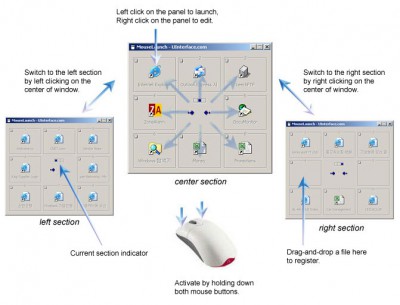
You can activate the launcher by holding down both mouse buttons at any location in Windows.
Once the launcher activated, move the mouse cursor a little to the registered program/file (eight-direction) and click to launch.
Once you experienced, it will takes less than 1 second for entire action.
After you launch a file, the launcher will be minimized automatically not to disturb your further operation.
Drag-and-Drop registration
MouseLaunch supports a drag-and-drop to register your favorite application programs and files to the launcher panels.
You can drag and drop a file from desktop area, Start menu, Quick Launch area, Windows Explorer and even from the favorities of the Internet Explorer.
You can register up to 8 files for one section and change the location freely by right-clicking at the panel.
Multi-Section support
MouseLaunch supports 3 sections - center, left, right and each section contains 8 panels. This enables you register/launch up to 24 files. (3 sections x 8 panels)
Limitations
tags the launcher drag and and drop you can mouselaunch supports left right down both both mouse mouse buttons holding down
Download MouseLaunch 5.6.2

Purchase:  Buy MouseLaunch 5.6.2
Authors software
MouseLaunch 5.6.2
UInterface.com
MouseLaunch is useful program and file launcher which is activated by holding down Both Mouse Buttons.
 ServiceShell 1.7
UInterface.com
ServiceShell is a useful user-defined Windows service manager utility.
Similar software
MouseLaunch 5.6.2
UInterface.com
MouseLaunch is useful program and file launcher which is activated by holding down Both Mouse Buttons.
 Chameleon Launcher 1.5
ALKSoftware
Chameleon Launcher gives you the quickest and easiest way for launching applications, opening folders or documents.
 Launcher 3.8
Stefan Moka
Launcher is a useful Quickstart-ToolBar for the Windows Desktop.
 Sumka 2.1.1.8
Deskex group
Sumka is a useful and reliable program launcher that comes with different abilities:
1.
 Advanced Launcher 1.33
Alentum Software, Inc.
Advanced Launcher is an application designed as a powerful toolbar and tray launcher.
 Key Launcher 1.5
barefoot productions
Key Launcher is an utillity that allows the assignment of hot keys to system commands.
 Sigma Launcher 1. Beta 20
Neodagger Systems
Sigma Launcher is an easy-to-use program launcher and window manager.
 Invisible Launcher 1.01
Segobit Software
Invisible Launcher is a configurable software designed to offer you a fast way to organize and start up your applications and to open folders, shortcuts and documents that you frequently access.
 Better Launcher 1.0
publicspace.net
Better Launcher will provide an instant access to all your programs, documents, files and folders.
 Flexiblesoft Launcher 3.1
FlexibleSoft Co.
Flexiblesoft Launcher is a small application that will allow you one mouse-click access to a pop-up menu of your favorite shortcuts, minimizing use of valuable desktop space and system resources.
Other software in this category
 AutoMove 1.9.4
K.Tkalec
AutoMove is a service, which moves, copies and renames files/direcotries on hard disks by user defined criteria.
 1 Click Runner 2.0
Gapso Software
1 Click Runner is specially designed for fast start of programs, fast opening files, fast access to WWW and FTP sites, fast starting of e-mail writing, and fast creation of links.
 Windows Keyboard Indicator 2.0.1
Clever Components
Windows Keyboard Indicator is a small utility which stays in your windows system tray.
Invisible Launcher 1.01
Segobit Software
Invisible Launcher is a configurable software designed to offer you a fast way to organize and start up your applications and to open folders, shortcuts and documents that you frequently access.
 LogonStudio 1.0
Stardock Corporation, Inc.
LogonStudio allows users to easily customize new logon screens for Windows XP.

 RSS
RSS