iMarkup 3.98.5
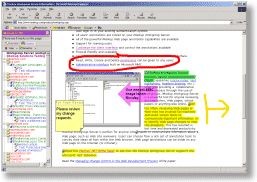
 The iMarkup Client is a web page annotation tool that allows annotations and other markups to be made from within your web browser to "live" web pages.
|

 40.00
40.00  Trial
Trial 0K
0K
 Windows Vista
The iMarkup Client is a web page annotation tool that allows annotations and other markups to be made from within your web browser to "live" web pages.
These markups will be remembered, and automatically displayed the next time you visit that page. Markups include freeform drawings with our Paint Brush tool, text markup tool, and the ability to use one of the many sticky notes provided with the product.
iMarkup is a software that allows you markup web pages.
All markups can be organized using the iMarkup Organizer – an intelligent "bookmark" where previously marked web pages can be found easily using the user's personal criterion and comments.
All of your markups and your annotation are stored encrypted on your PC. No one on the Internet can see them unless you decide to share your marks by emailing a marked page to them.
When sending an email with markups to another user, if they do not have iMarkup installed, they will need to install the FREE iMarkup Plug-in. This will allow them to review the markups sent to them, modify the markups, and send them back again. The iMarkup Plug-in does not allow markups to be made to web pages other than the pages sent to them.
If a recipient of an email with markups receives the "Open With" dialog box when trying to open the attachment they will need to install iMarkup or the free plug-in.
iMarkup runs better when Internet Explorer is your default browser. To make it your default browser start Internet Explorer and select the "Internet Options" menu under the "Tools" menu of the Internet Explorer 5 browser and the "View" menu of Internet Explorer 4.
Select the "Programs" tab and ensure the "Internet Explorer should check to see if it is the default browser" item is checked. Select OK, exit the browser, and then launch Internet Explorer again. You will be asked if you want IE as your default browser, choose Yes.
Limitations
tags internet explorer default browser web pages the internet the imarkup your default imarkup plug browser and the markups select the the free with markups and the
Download iMarkup 3.98.5

Purchase:  Buy iMarkup 3.98.5
Authors software
iMarkup 3.98.5
iMarkup Solutions, Inc.
The iMarkup Client is a web page annotation tool that allows annotations and other markups to be made from within your web browser to "live" web pages.
Similar software
iMarkup 3.98.5
iMarkup Solutions, Inc.
The iMarkup Client is a web page annotation tool that allows annotations and other markups to be made from within your web browser to "live" web pages.
 Annotation Pilot 1.47
Two Pilots
Annotation Pilot lets you capture screen and label the screenshot.
 AnnoTater 2.0
The DeKaf Company
AnnoTater is a Windows tool that embeds annotations in (not on) images (.
 TIFFDLL50 & TIFFDLL80
Informatik Inc.
Informatik TiffDLL50 and TiffDLL80 are ActiveX DLLs for graphics conversions and transformation, change of TIFF compressions, resolutions, image and canvas size (such as thumbnails), rotation, multipage options, split multi-page TIFF files into single page files, combine single page graphics files into a multipage TIFF file, image properties, printing functions, text annotation, image merge, watermarks, Formfiller, etc.
 FotoBalloon Pro 3.3.1.0
eSoft Imaging
You can tailor the look and feel of your notes with FotoBalloon Pro.
 Imaging Express 1.4.6
Vixelsoft
Imaging Express - A low cost image viewer and editor specially designed to handle document imaging for Windows XP, with the ability to read and save multi-page scanned documents in TIFF or PDF, supports over 30 other formats.
 ScreenSteps 1.0.5 b4
Blue Mango Learning Systems
Everyone loves visual documentation.
 Screen Shot Engine 1.0
Pochtennykh Brothers
Screen Shot Engine (SSE) is small library added into Internet Explorer.
 qPrtScr 1.0
qPrtScr
qPrtScr is a small application designed to make screen capture and annotation as painless as possible.
 MyScreen 3
Domino Computing Services
MyScreen is software that lets you use your computer screen as an interactive presentation, teaching, and learning tool.
Other software in this category
 dataStor 0.3
LAD
With dataStor you will be able define structures for storing any sort of information.
 The Birthday Chronicle 9.0
Ken Kirkpatrick Software
The Birthday Chronicle produces a personalized mini-newspaper front page, including graphics, that will be treasured for years.
 The Sands of Time 1.32
Ken Kirkpatrick Software
Ken Kirkpatrick Software, the largest publisher of personalization software, has released The Sands of Time, an easy-to-use Windows program that produces a suitable-for-framing keepsake memento that commemorates people`s birthdays, anniversaries, and other special days.
 My Diary 5.4
RB59.COM SOFTWARE
My Diary is the ideal application for anyone who makes a diary.
 SchedulerLite 1.3 build 144
Atkinson, Inglis & Associates
SchedulerLite is a general purpose staff and resource rostering / scheduling / booking software tool.

 RSS
RSS