FlashTask 2.1
 FlashTask helps you find your files and application programs in a second.
|

 19.00
19.00  Shareware
 0K
0K
 Windows Vista
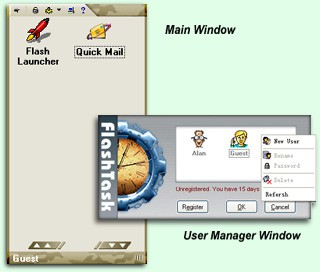
FlashTask helps you find your files and application programs in a second. You just simply drag the files and application programs which you intend to use into FlashTask before hand.
For example: you need to launch Photoshop to edit your photos while you are using Word. Thus you have to find Photoshop directory from Start Menu and you may not find it if it dose not exist in Start Menu.
But you can just use Shift+Space to launch FlashTask and type P(the first letter of Photoshop) to quickly launch Photoshop(if you've already added Photoshop into FlashTask). Same easy step when you need to use other application programes.
Sometimes you need to use Windows Explorer to open some directories very often, copy files or just open files. But you can just use Shift+Space to launch FlashTask and type the first letter of the file name to quickly find it.
You've collected lots of web sites in your favorites, and it also takes time to manage them when you've got lots of them. But you can just use FlashTask to help you make your own collection. Thus your collection won't be modified or deleted by others because FlashTask is a multi-User software. Your family member and your firends can have different setup and collections.
When you are busy on your computer and you need to send emails to your family, firends and collegues you can FlashTask's QuickMail to send your emails in a second.
When you need to use different programs you will have to open them one by one. But with FlashTask, you just simply click what you've dragged into FlashTask. FlashTask offers the function for batch task, you can just set it up yourself.
Sometimes you will need make new configurations for your system, you normally use control panel. You can easily do this directly from FlashTask.
FlashTask features
Limitations
tags you can you need when you can just into flashtask launch flashtask you will multi user but you shift space just use application programs web sites
Download FlashTask 2.1

Purchase:  Buy FlashTask 2.1
Authors software
FlashTask 2.1
JungleMetal Computing Inc.
FlashTask helps you find your files and application programs in a second.
Similar software
FlashTask 2.1
JungleMetal Computing Inc.
FlashTask helps you find your files and application programs in a second.
 SadMan Search 3.2
Simon Armstrong
SadMan Search is an application that helps find files that contain a particular piece of text.
 Drag Drop and Replace 1.0
Skyjuice Software
Drag Drop and Replace is an utility that helps you to simply fill in the words to replace, and drag and drop the files to be replaced.
 RunViewer 1.02
DevelopEx
RunViewer is a simple application which helps you to see and disable programs your Windows and browser runs at startup.
 InstallGadget 1.13
Sweat Technologies
Simply drag a folder with your application in it onto InstallGadget and within 10 seconds you will have an installer.
 Uploader! 3.6
k.soft
Uploader! is a completely task-free way which helps you to quickly upload files to the internet.
 Cleanse Uninstaller 3.40
Zards Software
Cleanse is an application uninstaller that will find and remove even the most stubborn of programs.
 LiveWire! Broadcast 3.7
East Bay Technologies Inc.
LiveWire! Broadcast helps you find and play virtually anything within seconds.
 Find Duplicate Files 3.1
miami share
Find Duplicate Files is an application that find and delete all duplicate files on your computer.
 Instant LOCK 2.5
MTG Security
Instant Lock is a folder security application.
Other software in this category
 Shutdown NOW! 4.6
Dynamic Worlds
 EMCO Remote Shutdown 2.0
EMCO
EMCO Remote Shutdown is a machine shutdown utility which enables you to shutdown machines on your LAN either immediately or at a future time.
 Smart Bomb PC Shutdown 1.0.4.0
Nulidex Systems
Smart Bomb PC Shutdown is a power-off utility with intelligence.
 ID Shutdown Manager 2.5
Librarysmith Software
ID Shutdown Manager has been designed to log-off, reboot, shutdown, switch-on (Wake on LAN), audit hardware/software or execute programs remotely on networked computers running Microsoft Windows from a remote location on a network.
 Astatix Launcher 1.63
Astatix Software
Astatix Launcher allows you to quick start any applications, open documents and explore folders in a single click.

 RSS
RSS