Update Cleanup 2.00
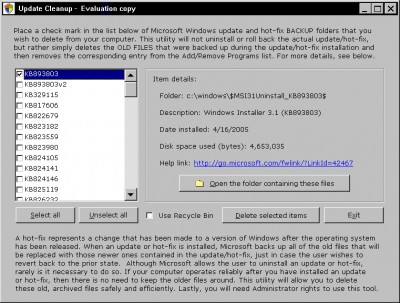
 Update Cleanup safely removes the backup files that were created when installing a Windows hotfix or service pack update.
|

 4.00
4.00  Trial
Trial 0K
0K
 Windows XP/Vista
Update Cleanup safely removes the backup files that were created when installing a Windows hotfix or service pack update. Removing the old backup files with Update Cleanup will free up hard disk space. Update Cleanup will also remove the associated Registry entries for these items -- entries that visibly show up as unnecessary application entries in the Add/Remove Programs panel.
Microsoft regularly makes available critical Windows XP and Windows 2000 security patches (or hotfixes as they are also called) which ensure that your operating system keeps up to date. These patches/hotfixes are obtained in a variety of ways:
A) By visiting the Windows Update or Microsoft Update website (accessible from your START button).
B) Through the Automatic Update service which runs in the background on your PC and weekly checks for recently issued updates/patches/hotfixes.
C) By System Administrators downloading and applying patches and hotfixes to your PC.
Regardless of how the patch/hotfix is obtained one thing you should be aware of: All of the files that will be replaced are backed up on your hard drive just in case the update goes awry and you need to return your PC to its prior state. These older files that are replaced are stored in hidden folders in your Windows system folder.
Over time these backup folders accumulate and can occupy a significant amount of disk space. For example a typical Windows 2000 PC would have had over 80 patches/hotfixes installed between Fall 2002 and Fall 2005. These 80+ udates created 80+ folders and contains thousands of old files. On a typical Windows XP PC a user could expect to find over 3 dozen patches/hotfixes installed over a period of just 12 months! The amount of hard disk space occupied by these old, backed up files could easily reach 800 megabytes. Are these backed up files useful to retain, or can they be deleted and disk space freed up?
After you install an update and reboot your PC you should monitor your PC for a few days to see if everything is working properly, and that nothing "broke" during the update. Sometimes an update can go awry for a multitude of reasons, and if so, you can uninstall the recent patch/hotfix through the "Settings > Control Panel" where you will find an Add/Remove Programs applet (tool). All of the updates will be listed there by date.
However, if days and weeks pass and your computer is running perfectly, then there is no need to keep those backed up old files on your hard
tags disk space patches hotfixes update cleanup files that replaced are your hard the update old files hotfixes installed typical windows you should through the hard disk
Download Update Cleanup 2.00

Purchase:  Buy Update Cleanup 2.00
Authors software
 Another Notepad 1.70.32
PC Shareware Inc
ANOTHER NOTEPAD - Windows text editor.
 Zip Code Companion 4.14
PC Shareware Inc
Zip Code Companion is a handy database which allows you to quickly find or verify zip codes, states, cities and area codes within the USA.
 Password Guardian 5.01
PC Shareware Inc
Password Guardian is handy software database that stores all of your passwords into a single, convenient file.
Update Cleanup 2.00
PC Shareware Inc
Update Cleanup safely removes the backup files that were created when installing a Windows hotfix or service pack update.
Similar software
Update Cleanup 2.00
PC Shareware Inc
Update Cleanup safely removes the backup files that were created when installing a Windows hotfix or service pack update.
 Hotfix Manager 2.0
Digital Labs, LLC
Hotfix Manager provides administrators with the ability to instantly protect their network from the latest security threats by utilizing the scheduling service available in all Windows NT based Operating Systems.
 Software Update Service StandAlone 1.004
Starbal
SUSS (Software Update Services Standalone Tool) is a command-line application that allows you to control and manage your windows clients in your patch management architecture.
 Service Pack Manager 7.1.1.3
Gravity Storm Software
Looking to manage the roll out of Windows Service Packs, including the recently released Win2K SP4, within your enterprise network?
Service Pack Manager application discovers NT/2000/XP/2003 systems and reports on the current OS and Service Pack level.
 ASIS Backup 2.4
SOFTOTEC
ASIS Backup - We know what you think: "Another backup utility? I have seen too many of these already.
 Backup 2.0
Roncli Productions
Backup is a powerful FTP file backup solution which works as a Windows service.
 XPSecurity 2005c
BitFantasy, Inc
Have A Secure Windows XP System with Service Pack 2 and XPSecurity !
XPSecurity is the most professional utility to  manage and optimize the security settings of Windows XP + Service Pack 2(SP2).
 CleanUp! 2.5.0.3
emesoft
CleanUp! is a pure system maintenance tool for Windows.
 Directory Update 1.1
ITCS Hawaii
The Directory Update service is a useful .
 Web Update Wizard 4.0.0.10
Power Programmer
The Web Update Wizard lets you add 'update over the web' functionality to your applications with just a single line of code.
Other software in this category
 Folder Clean v1.3
Digital-W Soft
This system tool is used to automatically clean unwanted files from your folders.
 Evidence Eliminator 5.058
evidence-eliminator.com
Did you know.
 WipeUrTrax 1.30
Collake Software
WipeUrTrax is an advanced web browser history management and cleaning application that offers unique functionality of concealing some browsing activities without having to delete the entire WipeUrTracks, browser history.
 Crystal Clean .0 Beta 1
Crystal Art Software.
Crystal Clean is the product that brings you more harddisk space, a higher performing system and anonymous Internet surfing.
 IE Pets 1.0.0.1
Enjoy! Software
IE Pets brings privacy and cleanup features to Internet Explorer using a convenient toolbar installed right into IE.

 RSS
RSS