ABarCode for Access 10.2.1
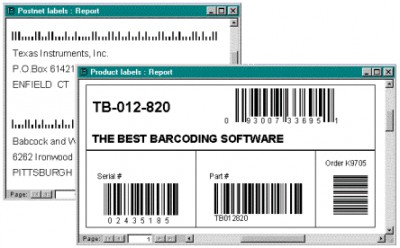
 ABarCode is a Microsoft Access add-in which will allow you to convert any data in Access reports into bar code symbols specifications.
|

 124.00
  Shareware
 0K
0K
 Windows Vista
ABarCode is a Microsoft Access add-in which will allow you to convert any data in Access reports into bar code symbols specifications.
Available bar code types are EAN-8, EAN-13, UCC/EAN-128, Code 11, Code 128, Code 39, Code 93, Codabar, UPC-A, UPC-E, Interleaved 2 of 5, Postnet, PDF417 and Code 16K.
You may print several bar codes of several types in any report's section and subreports. Check digits and start/stop codes are automatically computed and added. Symbols may be horizontal or vertical oriented, either fixed or automatically scaled filling a Text Box area.
You only have to design a report, add text boxes containing the information you want to barcode, open the ABarCode add-in, add these text boxes to 'Barcode fields', and select the type of bar codes you want.
You will find more information about the available types and its characteristics in the ABarCode help file. ABarCode is available for Access 97, Access 2, Access 2002 and Access 2003.
Requirements
Limitations
tags bar codes you want the abarcode text boxes codes are 128 code bar code
Download ABarCode for Access 10.2.1
 Download ABarCode for Access 10.2.1
Purchase:  Buy ABarCode for Access 10.2.1
Authors software
ABarCode for Access 10.2.1
ABarCode Software
ABarCode is a Microsoft Access add-in which will allow you to convert any data in Access reports into bar code symbols specifications.
 ABarCode ActiveX 1.2.1
ABarCode Software
ABarcode ActiveX is a software component that lets you print bar codes in any Windows application that supports ActiveX control technology, including the MS Office suite (Excel, Access, Word, PowerPoint, FrontPage), as well as in your own developments with ActiveX enabled languages like Visual Basic, Visual C++ and others.
Similar software
ABarCode for Access 10.2.1
ABarCode Software
ABarCode is a Microsoft Access add-in which will allow you to convert any data in Access reports into bar code symbols specifications.
 Barcode ActiveX Control 3.3
VBC Software
Barcode ActiveX Control.
 Access-to-MSSQL 4.5
Intelligent Converters
Access-to-MSSQL is an application to convert Microsoft Access databases to Microsoft SQL server.
ABarCode ActiveX 1.2.1
ABarCode Software
ABarcode ActiveX is a software component that lets you print bar codes in any Windows application that supports ActiveX control technology, including the MS Office suite (Excel, Access, Word, PowerPoint, FrontPage), as well as in your own developments with ActiveX enabled languages like Visual Basic, Visual C++ and others.
 Symbols 1.0
Graphic Xtras
Symbols Collection:
7000+ symbols for use in Adobe-Macromedia ® Fireworks ™ including 3D designs, circular designs, curved shapes, star designs, splatterns and more.
 4TOPS Access to Word Mail Merge XP/03 5.0
4TOPS
4TOPS Word Link is an add-in for Microsoft Access (both mdb and adp), which adds data from Microsoft Access in Word documents.
 MS Access to XML Convert Software 7.0
Sobolsoft
MS Access to XML Convert Software helps you convert Microsoft Access tables to XML through a step by step wizard.
 Recovery for Access 3.2.19679
Recoveronix Ltd.
Recovery for Access is a useful and reliable data recovery utility for Microsoft Access databases (.
 Word Link for MS Access 97 4.1
4TOPS
4TOPS Word Link is an add-in for Microsoft Access, which adds data from Microsoft Access in Word documents.
.jpg "DBF to MDB (Access) 3.01") DBF to MDB (Access) 3.01
DBF to MDB (Access) 3.01
WhiteTown Software
The DBF to MDB (Access) program will allow you to convert your dbf files to MDB (Microsoft Access) format.
Other software in this category
 PickList 1.3.36
Dev4Dev
PickList is an ActiveX control for selecting items from one list (available) and moving them to another list (selected).
 LLLib Licensing Library 3.0
GPP Software
LLLIB is a Software Licensing Library, supplied as .
 TreeView 1.8.76
Dev4Dev
TreeView displays a hierarchical list of Node objects, each of which consists of a label and a bitmap.
 TachyonSpell 1.1c
Tachyon Labs
An ActiveX DLL that adds Spell Checking functionality to COM-enabled development tools, it contains a 102,000 word list and a very easy to use Interface.
 PSS Update Check Control 1.1
Practical Software Solutions L
PSS Update Check is a Royalty Free Active X component that allows you to add that "Check for Update" button or menu item to you application in just a few lines of code.

 RSS
RSS