Syncro SVN Client 9.1
 Syncro SVN Client is a very useful tool that makes easier the document and code sharing between content authors or developers.
|

 59.00
59.00  Trial
Trial 0K
0K
 Windows Vista
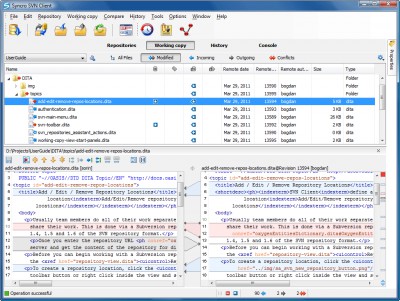
Syncro SVN Client is a very useful tool that makes easier the document and code sharing between content authors or developers. This multiplatform Subversion front-end allows you to browse repositories, check for changes, commit changes, update your working copy and examine the revision history.
The Syncro SVN Client was initially developed as an embedded application in the XML Editor and starting with version 8.1 of the editor it is available also as a separate product.
The Syncro SVN Client has been designed to offer powerful actions while keeping the interface as clean and simple as possible.
Syncro SVN Client features
Flexible Configuration of the User Interface
The Syncro SVN Client is composed of several views allowing you to browse the Subversion repositories and your local working copies, compare and merge modifications, check the revision history. All views are dockable, meaning that you can move them to create the optimal layout for your use case.
Subversion Repository Browsing
You can add multiple SVN repositories to the list and browse them in parallel. In this way you can identify the resources you need to checkout, or even create branches or tags directly in the repository.
Synchronizing with a Subversion Repository
In the synchronize view you can see the overall status of your working copy resources when compared to the repository resources. The view focuses on incoming and outgoing changes, where incoming ones are the changes that other users have committed since you last updated your working copy. The outgoing changes are the modifications you made to your working copy as a result of editing, removing or adding resources.
View Differences
One of the most common requirements in project development is to see what changes have been made to the files from your working copy or to the files from the repository. You can examine these changes after a synchronize operation with the repository, by using the Open in compare editor action from the contextual menu.
View Resource History
In Subversion, both files and directories are versioned and have a history. If you want to examine the history for a selected resource and find out what happened at a certain revision you can use the History view.
Requirements
Limitations
tags working copy you can syncro svn your working the repository svn client from the outgoing changes the syncro allows you user interface the user the history
Download Syncro SVN Client 9.1
 Download Syncro SVN Client 9.1
Purchase:  Buy Syncro SVN Client 9.1
Authors software
Syncro SVN Client 9.1
SyncRO Soft Ltd
Syncro SVN Client is a very useful tool that makes easier the document and code sharing between content authors or developers.
Similar software
Syncro SVN Client 9.1
SyncRO Soft Ltd
Syncro SVN Client is a very useful tool that makes easier the document and code sharing between content authors or developers.
 oXygen XML Editor 7.2
SyncRO Soft
oXygen XML editor supports XML, XSL, TXT, XSD and DTD documents.
 MioNet 1.8.4
Senvid
MioNet is the first and only personal private network that makes remote access and file sharing seamless, simple and secure.
 phpSHIELD PHP Encoder 8.0
phpSHIELD.com
phpSHIELD was developed for helping software authors, freelance developers and anyone publishing scripts to protect their intellectual property with ease.
 MultiUpdate 3.0
KSWare, Inc.
You are a web page developer and have a large web site with hundreds of pages?
How long did it take you to update a small piece of code on every page of your site?
What will happen if an URL to a banner ad that you have on every page changes?
What if you have to change the year in your copyright sign that you have at the bottom of your website?
What if you need to do any other minor changes to your code?
You'll spend hours changing every page of your site! With this small and handy tool you'll save days of your expensive time!
What web site authors want is software that makes life easier and gives them more time to work on their site.
 Order Form Source Code 5.2
DynoTech Software
ATTENTION SOFTWARE AUTHORS: Visual Basic source code will let you add an order form to your program.
 Netozaur 0.5 Alpha Build 2
Mindbend Software S.R.L.
Netozaur is a useful and reliable desktop/file/voice sharing tool that is designed to serve as a multi purpose sharing tool.
 WinTabs 2.09
Primoz Gabrijelcic
WinTabs is a little application that makes it easier to access multiple documents while using one of 71 supported programs.
 PiXPO 3.0
How2Share Technologies
PiXPO is able to change the way you think about sharing images.
 PeerSynergy Desktop Sharing 2.0.1
Myradus L.L.C.
PeerSynergy Desktop Sharing enables live sharing of your desktop across a local network.
Other software in this category
 Sax.net SmartUI
Sax Software Corp.
Sax.
 JWizard 1.0
Visionary Technologies
JWizard allow to build professional "step by step" interface (ie.
 RCLocalizer 1.8.0.1
myncos
RCLocalizer localize and translate resource script file (rc)in any language for creating multilingual aplications.
 XD++ MFC Library v5.60 (VC7.0)
ucancode software
The XD++ Class Library is a set of classes built on the Microsoft Foundation Classes.
 Project Analyzer 10.3
Aivosto Oy
Project Analyzer is a Visual Basic source code analyzer, optimizer and documentor.

 RSS
RSS