NetworkActiv PIAFCTM 2.2.2
 Easy yet advanced, quad-mode packet analyzer,
Mode 1 (Packet Interceptor)
While in this mode, PIAFCTM captures and analyzes network data packets.
Easy yet advanced, quad-mode packet analyzer,
Mode 1 (Packet Interceptor)
While in this mode, PIAFCTM captures and analyzes network data packets.
|

 40.00
40.00  Demo
Demo 0K
0K
 Windows XP/Vista
Easy yet advanced, quad-mode packet analyzer,
Mode 1 (Packet Interceptor)
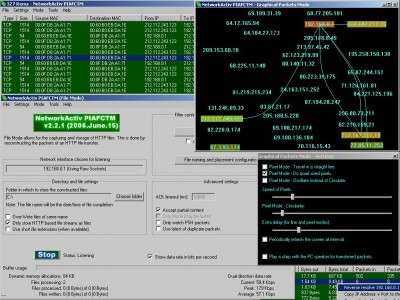
While in this mode, PIAFCTM captures and analyzes network data packets. PIAFCTM allows you to view special information encoded in each packet such as the source and destination IP addresses, the source and destination ports, and many other pieces of information. When capturing using the NetworkActiv PIAFCTM Packet Driver, data is captured at the ethernet level allowing you to see the MAC (Media Access Control) addresses of each computer from which you have received packets. Many packets can be captured in a short period of time, and so you may not wish to view them all. With PIAFCTM, you can filter the capturing of packets by IP address, port, packet size, protocol, and/or text-sub-string searching of each packet's content. Also, you can search for a text-sub-string within the current list of packets, save the list of packets to a text file, view the data payload content of each packet (in Hex, Decimal, Text, or standard Hex+Text style), and more.
Mode 2 (HTTP File Interceptor)
With this mode, you can capture images, web-pages, web-page initiated HTTP downloads, and more. This is done by the automated capturing and analyzing of HTTP (Hyper-Text Transfer Protocol) specific packets. When PIAFCTM sees an HTTP file transfer hidden in the mass of packets, it starts collecting the packets associated with the file being transferred and when it has received all of them, it saves the file to your disk (at a location chosen by you). You can filter the saving of files by IP address, port, file extension, and/or file size.
Mode 3 (Statistical Mode)
Statistical Mode monitors and analyzes the network traffic and forms statistical information pertaining to each IP address, each IP address pair, and each local port.
Unlike many packet analyzers out there, this software does NOT require (nor does it use) WinPCap, nor any other third party extensions.
Limitations
tags you can each packet text sub sub string and more http file statistical mode the file address port can filter the source and analyzes source and
Download NetworkActiv PIAFCTM 2.2.2
 Download NetworkActiv PIAFCTM 2.2.2
Purchase:  Buy NetworkActiv PIAFCTM 2.2.2
Authors software
NetworkActiv PIAFCTM 2.2.2
NetworkActiv
Easy yet advanced, quad-mode packet analyzer,
Mode 1 (Packet Interceptor)
While in this mode, PIAFCTM captures and analyzes network data packets.
 NetworkActiv Scanner 4.0
NetworkActiv
NetworkActiv Scanner is a network exploration and administration tool.
Similar software
NetworkActiv PIAFCTM 2.2.2
NetworkActiv
Easy yet advanced, quad-mode packet analyzer,
Mode 1 (Packet Interceptor)
While in this mode, PIAFCTM captures and analyzes network data packets.
 Sniffem 1.12
YASC .ltd
A Packet Sniffer is a program that captures, monitors and analyzes network traffic, detecting bottlenecks and other network related problems.
 EtherDetect Packet Sniffer 1.41
EtherDetect Packet Sniffer
EtherDetect Packet Sniffer is an easy for use and award-winning packet sniffer and network protocol analyzer, which provides a connection-oriented view for analyzing packets more effectively.
 Give Me Too Network Sniffer 2.50
KMiNT21 Software
Give Me Too Network Sniffer is an easy-to-use and affordable network analyzer, packet snifferand network sniffer that plugs into computer networks and lets you easily monitor any Internet and e-mail activity that occurs in them.
 Network Traffic Monitor Analysis Report 7.1
Javvin Company
Network Packet Analyzer enterprise edition is a useful and advanced network traffic monitoring, analysis and reporting.
.jpg "Packet Sniffer SDK for Windows (ActiveX Edition) 2.3.1") Packet Sniffer SDK for Windows (ActiveX Edition) 2.3.1
Packet Sniffer SDK for Windows (ActiveX Edition) 2.3.1
microOLAP Technologies LLC
Packet Sniffer SDK (PSSDK) is the most powerful component suite for network packet capture in Windows OS family environment.
.jpg "Packet Sniffer SDK for Windows (DLL Edition) 3.0") Packet Sniffer SDK for Windows (DLL Edition) 3.0
Packet Sniffer SDK for Windows (DLL Edition) 3.0
microOLAP Technologies LLC
Packet Sniffer SDK (PSSDK) is the most powerful component suite for network packet capture in Windows OS family environment.
 Network Protocol Packet Analyzer PRO 6.4
Javvin Company
Packet Analyzer is an advanced packet analysis and sniffing tool with powerful protocol decodes capabilities.
 MaaTec Network Analyzer 1.80
MaaTec
Network Analyzer / Packet Sniffer with easy to use filtering and intuitive GUI.
 Network Troubleshooting Analyzer 6.3
Javvin Company
Packet Analyzer is an advanced packet analysis and sniffing program with powerful protocol decodes capabilities.
Other software in this category
 A1Monitor 7.0.1
A1Tech
A1Monitor is a software designated to monitor your network and web server
Here are some key features of "A1Monitor":
· Monitor multiple URLs (http or https)
· Ping any IP address
· Monitor any TCP port (ftp, pop3, smtp, telnet etc.
 Friendly Pinger 4.2.3
A.Kilievich & Co.
FPinger lets you visualize your computer network as an animated display with indications for which computers are present or absent.
 SiteMonNak 2004 V1.0.0
Complete Software Solutions
SiteMonNak can monitor and report on the status of a variety of items that affect the accessibliity of web sites including https web sites, items like DNS, Ping and HTTP response.
 The Guardian 5.5.6
PB Software
Keep critical programs running and be alerted.
 Box Monitor 1.51
BoxWare
BoxMonitor is a useful Server-Monitor program with an intuitive interface.

 RSS
RSS